How to Open the Entire Store at Sunset Mall The Sims Freeplay

This article describes how to open all the shops in Sunset Mall The Sims Freeplay.

Before you can visit Sunset Mall, you must build it, and complete The Sunset Mall Quest.

There are 2 floors at the sunset mall. Below we will explain how to open a shop and facilities on the first and second floors of Sunset Mall The Sims Freeplay

NOTE:
To clean the area in the Sunset Mall The Sims Freeplay, all you have to do is click on the item, garbage, or spot with the exclamation mark above, and click the option that appears

You can order 10 Sims at once to work together to clean the sunset mall at one time. By ordering lots of sim at once, you can clean the sunset mall faster and of course can save time.


THE FIRST FLOOR

You must complete The Sunset Mall Quest to be able to visit the Mall for the first time. After you finish The Sunset Mall Quest, you can immediately clean the area at Sunset Mall

Here’s how to clean and open the area and shop at Sunset Mall The Sims Freeplay

Here’s how to clean and open the area and shop at Sunset Mall The Sims Freeplay


AREA 1

To open this area, you must complete The Sunset Mall Quest
After that, clean up garbage and items scattered in the area

AREA 2
To open area 2, you must complete The Sunset Mall Quest
This area is to the right of Area 1. This area 2 will lead you to the Modeling Catwalk. By building a Catwalk Modeling, sim can have a Catwalk Hobby.

Before heading to Modeling Catwalk, you have to clean up garbage and items scattered along the road to Modeling Catwalk.

After you finish cleaning, please click on the Catwalk stage, select “Build”

AREA 3
To open area 3, you must clean Area 2 and build 5 stores.
After you open 5 shops, you can start cleaning Area 3 so you can open area 4.

AREA 4
To open area 4, you have to clean area 3 and build 8 shops.

AREA 5
To open Area 5, you must clean Area 4 and build 8 stores.

Area 5 is the area that leads to the Bowling room. By building a bowling room, sim can have a hobby of Bowling.

To open a Bowling Area, you must complete the Catwalk Hobby first.


How to open / Unlock the existing store on the 1st floor of Sunset Mall The Sims Freeplay

Before building a shop at Sunset Mall you must open it first.

Note the map above. The number on the map is the shop store on the 1st floor of the sunset mall.

To open stores number 1 and 2, you must complete The Sunset Mall Quest

To open stores number 3-13, you must complete the Catwalk Hobby

To open stores number 15 and 16, you must complete the Hobby Bowling

To open the Pickle Sauce Burger Bar (on the 2nd floor), you must complete The Sunset Mall Quest on time. But if you can’t complete The Sunset Mall Quest on time, you can still build it by clicking Pickle Sauce, selecting “build”.

To open the Juice Bar (on the 2nd floor), you must complete the Hobby Bowling first. Then click Juice Bar, select “build”

To go to Level 2 at Sunset Mall, you can click the up down sign on the right of the screen

THE SECOND FLOOR

You have to build an escalator near Burger Bar so you can go up to the 2nd floor, and complete the Pretty Little Planters Quest to be able to access and build facilities at 2nd floor Sunset Mall The Sims Freeplay

Here’s how to clean and open the 2nd floor area and shop at Sunset Mall The Sims Freeplay

AREA 1
To open this area, you must complete the Pretty Little Planters Quest, and clean up the trash and items scattered around the area

AREA 2
To open this area, you have to build 4 shops on the 2nd floor, and clean up the garbage and items scattered in the area

By cleaning this area, you can open Makeup Kiosk. After building Makeup kiosk, sim can have Makeup Artist Hobby

AREA 3

To open this area, you have to build 8 shops on the 2nd floor, and clean up the garbage and items scattered around the area

AREA 4
To open this area, you have to build 12 stores on the 2nd floor, and clean up garbage and items scattered around the area

By cleaning this area, you can open the Bargain Center Fashion Hunter. After building a Fashion Hunter Bargain Center, sim can have a Fashion Hunter Hobby

How to open / Unlock existing stores on the 2nd floor of Sunset Mall The Sims Freeplay

Note the map above. The number on the map is the shop store on the 2nd floor of the sunset mall.

To open shop numbers 1 – 4, you must complete the Pretty Little Planters Quest.

To open stores number 5-8, you must complete the Makeup Artist Hobby

To open stores number 13-16, you must complete the Hobby Bowling

To open Photoboots, you clear the Memory Lane area

To open the Wumples Play Center, you must complete the Pretty Little Planters Quest

To open Cinema, you must complete Fashion Hunter Hobby

To open the Indoor Skydiving Center, you must complete the Fashion Hunter Hobby on time!

To open the Coin Fountain, you must complete the Makeup Artist Hobby on time!

After you build a shop in Sunset Mall, you will get additional clothes, makeup and shoes. To buy these items at Sunset Mall, you can click the icon as shown below.

Or you can also buy it through the Wardrobe sim and click the store image tab on the right

How to Submiting a House The Sims Freeplay

After you complete the Extreme Home Takeover Quest you can send the results of your own home design to the EA so that all sims in the world can have a house as you design. The house that you submit to EA will appear in the Architect Homes section when you will build a house in The Sims Freeplay.

Here’s how to Submit a House in The Sims Freeplay:

First you have to do is prepare the house that you will submit. Make sure you have checked it until there is nothing that is lacking and in accordance with your taste.

After that, order the sim to go to work in the Real Estate Agency so that the Sign will appear in front of the sim house.

Click the Sign, and select “submit this house”.

REMEMBER!! Make sure you click the Sign in front of the house you want to submit to EA

After that a warning will appear. Read the terms and conditions, check the agreement, then click “YES” if you want to submit the house.

Wait until the process is complete until there is a notification like this

After the process is complete, all you have to do is wait.

You will not be given a notification or gift if your home is chosen. So, to find out whether your home is chosen or not, you should check Architect Homes frequently

Your house will not be deleted when you submit it to EA. You can submit as many design houses as you want

Can I also apply for a penthouse?
Yes, you can find the sign near the elevator around the penthouse.

How many times will Architect Homes update a new home?
Maybe about 2 weeks.

BIBLIOGRAPHY

How to Build Mezzed in The Sims Freeplay

After completing DIY Homes: All Mezzed Up Quest, you can add Mezzanine in the sim house!

Here’s how to make Mezzanine in The Sims Freeplay:

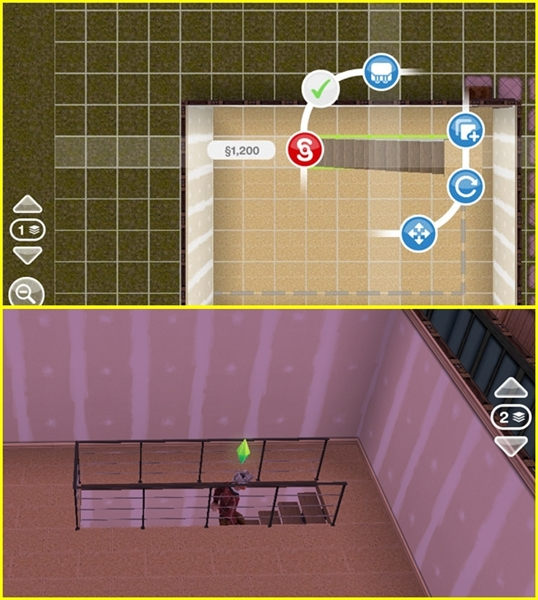
Open the Home Store click the “Mezzanies” section. Do it like making a room. Click the green check to complete the Mezzanine changes.

The number of simoleons that circle it is the price of the Mezzanine that you built.

TA DA … !! You made a Mezzanine!

Next, how to resize the Mezzanine The Sims Freeplay:

Note the white line circled in the image below

Drag the line aside like when making a Mezzanine. Click the green check to complete the Mezzanine changes.

Next, How to remove Mezzanine The Sims Freeplay:
To delete a Mezzanine, all you have to do is click on the middle of the Mezzanine until it looks like this

Then click the red symbol. Take it easy, you don’t have to bother saving all the Furnitire in the Mezzanine into the inventory. Because when you delete an array, all the items in it will automatically be stored in the inventory. The number that appears is the simoleon that you get from deleting the Mezzanine.

If there is a red color when building a Mezzanine, there may be a lamp below where you make mezzenine

You can also change the Mezzanine fence model by going to the Home Store, clicking on the “Railing” section. There are various forms of fences. Click the fence that you selected, then click on the Mezzanine that you want to change the fence.

BIBLIOGRAPHY

How to build Patios in The Sims Freeplay

After completing DIY HOMES: Paceful Patios Quest, you can add a Patios in the sim house!

Here’s how to make a Patios in The Sims Freeplay:
Open Home Store, click the “Patios” section. Do it like making a room. Click green check to finish changing the Patios.

The number of simoleons that circle it is the price of the Patios you build.

TA DA … !! You made a Patios!

Next, How to change the size of The Sims Freeplay Patios:
Note the white line circled in the image below

Drag the line like when making a Patios. Click green check to finish changing the Patios.

Next, How to remove The Sims Freeplay Patios:
To delete a Patios, all you have to do is click on the center of the Patios to look like this

Then click the red symbol. Take it easy, you don’t have to bother storing all the Furniture in the Patios into your inventory. Because when you delete an array, all the items in it will automatically be stored in the inventory. The number that appears is the simoleon you get from deleting the Patios.

If there is a red color when building a Patios (Patios):

Munkin because there are goods or plants nearby. Move the item first so as not to interfere with development

Maybe the Patios you made crosses the land boundary. Give a distance of 1 box from the sim landline to make a Patios, even if you want to make a Patios near objects, rooms, or other patios.

REMEMBER! You cannot build a Patios inside the house

You can also change the paving Patios motif by opening a home store, clicking “Paving patios”.
Kik on the patios you want to replace the paving.

You can also add fences and doors at once by opening the Home Store, clicking on the “Railing” section (to add a fence) and opening the home store section “Patios gate” (to add the door)

How to Build a Swimming Pool in The Sims Freeplay

After completing It’s All Going Swimmingly Quest, you can add a Swimming Pool on the sim home page! Swimming pool can be used by all ages except Baby and Toddler.

Here’s how to build a swimming pool in The Sims Freeplay:

Open Home Store, click the “Pools” section. Do it like making a room. Click the green check to complete the Pool changes

The number of simoleons circled is the price of building a swimming pool

TA DA … !! You managed to make a swimming pool!

Next, how to change the size of the Sims Freeplay Pool:
Note the white line circled in the image below

Drag the line like when making a Swimming Pool. Click the green check to complete the Pool changes.

Next, How to remove The Sims Freeplay Pool:
To delete a Swimming Pool, all you have to do is click on the center of the Pool until it looks like this

Then click the red symbol. Take it easy, you don’t have to bother storing all the swimming equipment in the Pool into the inventory. Because when you delete it, then all the items in it will automatically be stored in the inventory. The number that appears is the simoleon that you get from deleting the Pool.

If there is a red color when building a swimming pool:

Maybe because there are goods or plants nearby. Move the item first so as not to interfere with building

Maybe the pool you made crossed the land boundary. Give a distance of 1 box from the ground line sim to make a swimming pool, even if you want to make a swimming pool near objects, rooms, or other swimming pools.

Maybe the pool that you made is less spacious. At the very least, the pool must have a height of 5 boxes to be successfully built.

REMEMBER! You cannot build a Swimming Pool in a Swimming Pool

You can also change the pool paving motif by opening a home store, clicking “Pool Paving”. Click the paving motif that you selected, it will appear green as shown below:

Click on the pool you want to replace the paving.

You can also buy swimming equipment such as diving boards, slides, buoys, etc. in the Home Store section “Pool Items”

Note: You just have to place Pool Ladders so that the sim can come out of the pool

The swimming pool can also be dirty. The dirty swimming pool will be green. Click the pool, select “Clean” to clean the pool

You can use the Diving Board to do a Diving Hobby

BIBLIOGRAPHY

How to Add Basement inThe Sims Freeplay

After completing DIY Homes: Basement of Kings Quest you can add Basements or Dungeons in the sim house!

Note: Basement can only be built on the bottom of the sim house

Here’s how to make Basement in The Sims Freeplay:

Open Home Store, click the “Basement” section. When after you click “Basement”, you will be taken to the ground floor. There you will see white lines as drawn. This line shows the limit of the sim house area. But you can make Basement wider than the sim house area. Click the green check to complete the Basement changes.

TA DA … !! You made a Basement!

Next, how to resize Basement The Sims Freeplay:

Note the white line circled in the image below

Drag the line like when making a Basement. Click the green check to complete the Basement changes.

Next, How to remove Basement The Sims Freeplay:
To delete a Basement, all you have to do is click in the middle of the Basement to look like this

Then click the red symbol. Take it easy, you don’t have to bother saving all the furniture the Basement into the inventory. Because when you delete an array, all the items in it will automatically be stored in the inventory. The number that appears is the simoleon that you get from deleting the Basement.

If there is a red color when building the Basement, Maybe the Basement that you made crosses the land boundary.

REMEMBER! You must add a Ladder in the basement so that the sim can access the basement

BIBLIOGRAPHY

How to Add Balcon in The Sims Freeplay

After completing DIY Homes: Lovey-Dovey Balconies Quest, you can add a balcony in the sim house!

Note: Balcony can only be built on the upper floor of the sim house

Here’s how to make a Balcony in The Sims Freeplay:

Open the Home Store, click the “Balconies” section. When after you click “Balconies”, a yellow line will appear as shown. The yellow line is the limit of the balcony area that you can make.

Do it like making a room. Click the green check to complete the Balcony change.

The number of simoleons that circle it is the price of the balcony that you build.

TA DA … !! You make a balcony!

Next, How to change the size of the Balcony The Sims Freeplay:

Note the white line circled in the image below

Pull the line aside like when making a Balcony. Click the green check to complete the Balcony change.

Next, How to remove the Balcony The Sims Freeplay:
To delete a balcony, all you have to do is click on the center of the balcony to look like this

Then click the red symbol. Take it easy, you don’t have to bother storing all the furniture in the Balcony into your inventory. Because when you delete an array, all the items in it will automatically be stored in the inventory. The number that appears is the simoleon that you get from deleting the Balcony.

If there is a red color when building a balcony:

Maybe the balcony you made crosses the land boundary. Give a distance of 1 box from the sim land line to make a balcony, so also if you want to make a balcony near objects, rooms, or other balconies.

Maybe the balcony you made crosses the yellow line.

REMEMBER! You cannot build a balcony in the house

You can also change the Balcony paving motif by opening the home store, click “Balconie Paving”. Click on the paving motif that you selected, it will appear white as shown below, then Kik on the balcony you want to replace the paving

You can also change the balcony railing model by going to the Home Store, clicking on the “Railing” section. There are various forms of fences. Click the fence you choose, Click on the Balcony you want to change the fence.

How to Add Stairs in The Sims Freeplay

You can only add stairs after you complete the Multi Story Renovation Quest. The first step to place the person in the house is to open the home store, click “Floor Constructor”.

Floor Constructor functions to add the upper floor of the sim house. When you click Floor Constructor, a white fence will appear above the sim house.

Click the white fence to add the upper floor.

Each floor has a different price:
Floor 2 = S300,000
Floor 3 = S500,000
Floor 4 = S800,000
Floor 5 = S1,000,000

After that, you must build a room on the upper floor by:

Click the picture as below. the image is used to view the upper and lower floors

Then open the Home Store, click on “rooms”. Do it like making a room. Click here to create a room in The Sims Freeplay

After the room is finished. Go back to the floor below. Place the stairs just below the room you made on the 2nd floor. Stairs can be purchased at the Home Store “Stairs” section

NOTE: You must make a room on the second floor before you can add stairs!

The reason you cannot place a ladder at home is:

Maybe there are items in your place where you put the stairs.

Maybe the stairs that you put on are too big or bigger than the room where you put the stairs.

There maybe items in front of the stairs

Maybe there are goods or your stairs obstructed by a wall upstairs. Try checking the upper floor. Whether the stairs are too tight with the wall, or there are items that block the stairs.

If your household is too big and not enough with the room, choose a staircase with a minimalist model. Do not place the stairs too close to the wall of the floor 2. Location of Stairs 2 or 3 cities in front of the wall of the second floor, remove items that block the stairs.

You now have stairs in Sim’s house!

On what floor do I have to put up the stairs?
You have to place the stairs on the 1st floor to get up to the 2nd floor, place the stairs on the 2nd floor to go up to the 3rd floor and so on

If I delete my house do I still have floors 2 and 3 or do I have to buy it again?
Unfortunately you have to buy it again

If I add 4 floors, that means I can add 4 more sim to stay at the house?
No, maximum sim lives in 1 fixed 4 sim house

How to Build a Room in The Sims Freeplay

To build a house in The Sims Freeplay, the first thing you have to do is build a room. Here you will provide information about How to Build, delete and change The Sims Freeplay Room.

Here’s how to make a room in The Sims Freeplay:
Open the Home Store. Click the “Rooms” section. After clicking, place your finger in the middle of the screen, press, and slide it to form a room like the picture below:

The number of simoleons that circle it is the price of the room you built. Click the green check to complete the room change

To make the room next to it, you just need to do it like making the room before.

TA DA … !! You made a room!

Next, how to change the size of The Sims Freeplay room:

Note the white line circled in the image below

Pull the line aside like when making a room. Click the green check to complete the room change.

Next, How to delete The Sims Freeplay room
To delete a room, all you have to do is click in the middle of the room to look like this

Then click the red symbol. Take it easy, you don’t have to bother storing all the items in the room into the inventory. Because when you delete a room, automatically all the items in it will be stored in the inventory. The number that appears is the simoleon you get from deleting the room.

If there is a red color when building a room as shown below, maybe because there are items or plants nearby. Move the item first so as not to interfere with creating a room

Maybe it’s because of the room you made through the wall of the room in front of it.

Maybe there are items in your place to build a room.

Maybe your room crossed the land boundary

REMEMBER! You can’t build a room in the room

BIBLIOGRAPHY