Explanation of Simtracker The Sims Freeplay

Simtracker is a place where you can find out about sims information. Like what is being done sim, work, hobbies, relationships, and sim age.

Information
1. Simtracker
2. Occupation (Career)
3. Hobby
4. Life Dreams
5. Age Controler
6. Relationship

Note: for Life dream and Age controler will appear after you complete Life Dream & Legacies Quest

1. SIMTRACKER

A. Whistle. The whistle is useful for removing the sim where you want it. Example: If you want to order sim to visit Taaman, then all you have to do is, open Simtown, click City Park, after being in the city park, open the Simtracker, and click the picture of the whistle on the sim that you want you to send to the city park.
 

B. Home. The picture of this house is used to order the sim to go home.
 

C. Gray house. If the picture of the house is gray as in figure 3, it means the sim is already in his house.
 

D. Suitcase. A picture of a suitcase with an exclamation point in the middle shows that the sim is ready to work. Click the picture of the suitcase to order the sim to work
 

E. Gray suitcase. Show that the sim has finished working and must wait 24 hours before it can work again. Or you can also point out that the sim doesn’t have a job
 

F. Progress. Shows that sim is busy doing something. You can’t bother it like calling a sim or ordering it to work
 

G. Done. There is a XP flashing sign indicating that the sim has finished spelling out the task. Click on the XP symbol to complete the sim assignment
 

H. Sim age

Circular green circles in the sim image show the sim age. If the green circle is full, the sim will be ready to get older. Baby becomes toddler, toddler becomes preteen and so on.

For senior sim, if the green circle is full, he will death. This circle will appear after you finish Life Dream & Leagacies.

Click here for an explanation of the Life of Dreams and Orb The Sims Freeplay


2. OCCUPATION (Career)


A. Unemployed
Figure number 1 shows that the sim does not have a job.
Click the picture of the suitcase to choose the job you want. After clicking the suitcase, the display will appear as below

a. Showing the name of the job, and working hours
b. Show salary and XP earned from this work
c. Click Accept Jom to provide work on the sim
d. Click “Quit Job” to quit the job

B. Employed
Figure number 2 shows that the sim has a job.

a. Information
Show sim work and sim working hours

b. Career progress
Show how much is your career sim

C. Not Enrolled
Figure number 3 shows that the sim hasn’t gone to school.
Click the Toga image to send the sim. After clicking toga, the display will appear as below

1. Is a display for sim Preteen who will attend Elementary School. Click “Enroll?” to send sim Preteen.

2. Is a display for Teen sim who will attend High School. Click “Enroll?” to send Teen Sim.

D. Enrolled
Figure number 4 shows that the sim has gone to school.
a. Information
Show school sim, and school hours

b. Career progress
Showing is at the level of your sim school

3. HOBBY

Information:
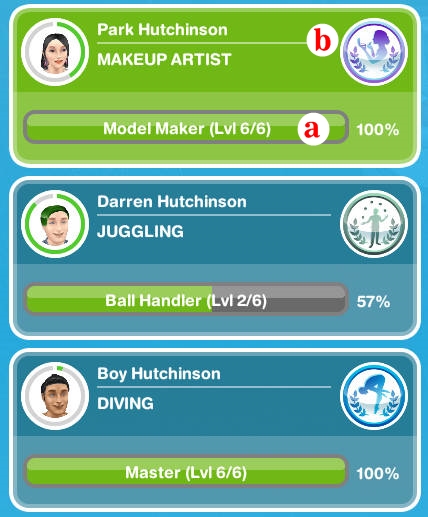
a. Show progress level of hobby
b. Is a symbol of a hobby that has a sim. Click the symbol. Then it will open a Hobby Bar view. Like the picture below

This is where you can find collectible items that you get from working on a hobby. Looks like the hobby bar is divided into several parts according to the sim age.

4. LIFE DREAM

This section will appear after you complete Life Dreams & Leagcies Quest. Here you can see the Lifedream progress that the sim has.

Click here for an explanation of the Life of Dreams and Orb The Sims Freeplay

5. AGE CONTROLER

This section will appear after you complete Life Dreams & Leagcies Quest. This tab will provide information about the age of the sim and control it.

Click here for an explanation of the Life of Dreams and Orb The Sims Freeplay

6. RELATIONSHIP

This section will provide information about sim simulations with other sim.

The green progress bar shows that the sim has a friendship with the sim

The Pink progress bar shows that the sim has a romantic relationship with the sim

The red progress bar shows that the sim is hostile to the sim.

If this section is empty, it means that your sim doesn’t have any friendship with anyone

Explanation of Profession Training Quest The Sims Freeplay

After you build one of the Profession Career buildings (Poice Station, Movie Studio, and Hospital) you will get Profession Training Quest. There is no limit to this quest, you can do this quest whenever you can. This quest aims to teach you how to work in Profession Career.

Below I will explain how to complete this quest. What I explained below is Flimmaker Profession but all professions have the same quest.

Here’s How to complete Profession Training Quest The Sims Freeplay

Work at a profession workplace = Instruct Sim to work as Filmmaker. Then instruct Sim to work. There will be a notification, select “Accompany Sim”, click “Yes”

Help a Sim at The Movie Studio = After being at Workplace, look for a sim that has a balloon on its head. Click the Balloon. After clicking, 2 choices will appear. Actually it’s not an option, it’s a request from the sim. If there are 2 choices, it means he has 2 requests, and you must complete both.

Click one of the options, let the sim do the work. When finished, a balloon will appear above the head of the sim. Click the balloon to complete the task.

Help again at The Movie Studio
= Click the sim that you helped again, and click the second option. let the sim do the work. When finished, a balloon will appear above the head of the sim. Click the balloon to complete the task.

Check Workplace storage
= Open the Profession Menu by clicking the icon in the top left corner, open the storage section tab

Check workplace overview = Open the profession menu, open the Workplace Overview section tab

Help a Sim at The Movie Studio = Help one sim with a balloon above his head. Click one of the options, let the sim do the work. When finished, a balloon will appear above the head of the sim. Click the balloon to complete the task

Check the work shift quota =

Fulfill special request = Click the Sim with the question mark balloon above the fist. Click one of the options, let the sim do the work. When finished, a balloon will appear above the head of the sim. Click the balloon to complete the task.

Trade Resource = Profession Menu, Click the resourche exchange section tab, click trade.

Upgrade workstation = Click the arrow icon as drawn. then click upgrade. Every time there is a station that is ready to be upgraded, the workstation will have an arrow icon as drawn

QUEST COMPLETE

After this quest is complete, you can continue to help sim work, or let it work alone. Like ordinary Career, you can also accelerate sim work using LP.

How do I help sim?

When the sim goes to work in the career profession, in the workplace there will be several sims with balloons on it. They are sims that need your help.

The image in the balloon is the resource that you will get after helping the sim. Balloons with the image “question mark (?)” Give a random resource.

If you notice, there is a gray line around the center of the balloon. The number of lines shows how many requests the sim has. You will only get resources after completing all sim requests. If there are 2 lines, it means he has 2 requests, and you must complete the 2 requests to get a prize.

If you succeed in fulfilling one request, the grey line will turn green, a coin balloon will appear above the sim head. Click the balloon to get coins and XP.

Experiance Point will help level up faster. So, helping sim work will make sim sims up level faster than ordering the work sim itself.

After all sim requests are fulfilled, then the entire gray line will turn green, click the balloon to get the resource present.

Each task is completed at a different workstation and only 1 sim can use 1 workstation in 1 time. To find out which Workstation is used to help sim, look at the posts at the top below

If the workstation is being used, the option will be gray as drawn. If it’s like this, help sim by using another workstation, or if you still want to use a workstation that is still in use, you can still click but, it will be recognized by LP.

What is the difference between Accompany Sim and Send Alone?
Accompany sim means that you will accompany your sim to work. by accompanying the sim work, you can gather resources and raise the career level faster.

While Send Alone means that you order the sim to work alone like a normal career, you can’t see when they work.

To help 1 sim must use the same sim to help him?
No. If in the workplace there are 2 sims that are working, the sim sims and the sim sims. Then there is the Robert Sim who has 2 requests. To help Robert does not have to order just to fulfill both requests. You can order Sasa to meet Robert’s request, and Doni fulfills 1 request of the remaining Robert.

Can I repel the sim that I don’t want to help get out of the workplace?
No, they are NPCs, they cannot be controlled. So they will stay there until you help

What is Resource Use?
Resource is used to build and upgrade workstations that are in the workplace.

What is the use of Coin in the career profession?
Coin is used to increase resource storage space

Can I tell sim to work alone like an ordinary career? will they still generate resources?
Yes, you can order sim to work alone. he will still be able to increase career levels, but cannot generate resources. Resources can only be obtained if you help sim work to meet consumer demand.

What is Work shift quota?
Work Shift Quota will tell you how many sim you have to help so that you can complete shifts faster and get bonus resources

What is a Workstation?
Workstation is the room in the workplace. You need to build and upgrade the room to get a new assignment.

What will you get after upgrading the workstation?
Every time you upgrade a workstation:
1. Action Time: The time to complete the task / request will decrease
2. Coin: The amount of coins earned will increase
3. Work XP: The amount of XP obtained will increase
But you are not directly and immediately get all the benefits. Pay attention to the picture below:

The circled image is the part that shows what you get if you upgrade the workstation. It shows that you will get an Action Time if you upgrade the workstation.

Why does it show that I have to upgrade using LP?
That’s because the resources needed for upgrading aren’t enough. Instruct sim to continue to collect resources in order to upgrade workstations without using LP.

Profession Menu
Click the icon in the upper left corner to open the Profession menu. There are 3 tabs in the profession menu including:

Workplace Overview
Here you can see what workstations you have opened, how many levels you care for and how many resources you need to upgrade your workstation

Storage
Here you can see how many resources you have collected. At the top there is a bar. It tells you how much storage capacity you have. on the right is the amount of coins you have.

To increase Storage storage space, you can use the coins you get from helping customers.

If you don’t have enough coins, you can use LP to increase storage space.

What if the storage space is full?
You can sell resources that you don’t need. Click the Simoleon icon in the upper left corner of each item, and specify the amount of resources you want to sell.


Resource Exchannge
In this Tab you can use Resource Spin or Mega Spin to get resources using simoleon or LP. You can also exchange Coin with the resources you want

How to use Resource Spin?

There are two types of spin resources:
Resource spin that uses simoleons: Click “Play” to spin. You will be charged simoleon if you use this Resource spin.

Mega Spin that uses LP: This spin can only be used by VIP level 2 players. You will be charged LP when using Mega Spin.

NOTE: You can only use spin every 4 hours. You can use 4LP if you want to use it immediately without having to wait 4 hours.

How do Resource Exchange work?
Look at the picture below. The image on the left is an item or coin that can be exchanged, while the right picture is the item that will be received from the exchange


PROFESSION SPECIALIZATION TRAINING

When you are at level 6 you will get a Profession Specialization Training. This quest will tell you how to choose special careers and ways to get promotions.

Here’s how to complete Profession Specialization Training The Sims Freeplay


Assign a sim to a specialty = Open simstracker section career (occupation). Click on the sim box that has reached level 6 in the career profession. Choose one of the 2 career specialists, click “yes”.


Complate a profession badge = See what you need to get a Badge. In the description drawn below, you get a task to help 3 people in the workplace. Order the sim to go to work, and fulfill the 3 sim request there.


NOTE: You can only complete 1 task and get 1 badge in 1 shift. In addition, you must complete 1 task in 1 shift alias in one work. If not, you have to repeat it from the beginning.

Suppose the task is you have to fulfill the 3 sim request, then in 1 shift or once you can only fulfill 1 sim request, then on the next work day you have to repeat from the beginning, that is fulfilling the 3 sim request to get 1 badge.

To get another badge, you have to wait for the next day.

Build a workstation = Build a workstation. If you don’t have enough resources, you can build a workstation using LP. If you don’t want to use LP, you can continue to collect resources before building a workstation.

Upgrade a workstation = Upgrade workstation

Check storage = Open the profession menu storage section

When you are at level 10 in the career profession, you will open work uniforms for career specialists who can be found in Wardrob.

Why does the suitcase icon that is usually made to go to work become orange?
The suitcase icon becomes an orange color indicating that the sim has left for work that day, and has to wait for the next day if you want to go to work again. If you are a VIP level 2 member, you can order the sim to work 2x a day, but you will still be charged 15LP to order the second time to go to work.

Just wait until the next day, and you can order the sim to work without having to become a VIP member.

How do I cancel the sim that is working?
Click on the x mark as drawn. Then it will appear option, Complate Shift, or Cncel Shift. If you choose complate shift, you will be put on an LP, but that means your work progress is limited, and you still get a salary.

How do I level up faster?There is no other way to level up in the career profession apart from helping sim in meeting sim demands at work.

But for Prefession Career Filmmaker, you can buy a Camera in the promotion r us building and use it at home sim to increase Career Level.

What symbols are drawn below?

That is the Symbol Simtown Market Event. Click here to find out how to complete the Simtown Market Event

NOTE:

1. You can only help 2 sim who work in the workplace profession. Suppose you have 5 people who work in the career profession. You cannot instruct 5 sim to work and collect resources. Only 2 sim can work and collect resources in one time. And if you order the 3 sim to work at the same time as the 2 sim, then they will work like an ordinary career which means you can’t see those who are working.

2. One workstation can only be used 1 sim at a time.

3. Important sim / Special Request is a sim that contains a question mark above

4. If you send the sim to work without helping the work. Sim will still be able to level up, even though it’s a little longer.

5. Each workstation can be upgraded 20x

6. You will be subject to LP if you want to upgrade your workstation, but you don’t have enough resources.

7. Only one sim can work in a career specialist.

8. There is no time limit to complete the Profession career. You can finish it whenever you want.

BIBLIOGRAPHY

Explanation of the Live Event of The Sims Freeplay

Live events are events that have a time limit. Which if you don’t play it at the specified time, you will miss this event. Live events always appear whenever there is a game update from The Sims Freeplay, if when there is an updated notification of the game and you don’t update it, you will not get a notification of a live event, so you won’t be able to follow it.

Live events have the same task. But the prize given is very interesting and fun. Usually the gifts given are furniture or clothes for sim that will not be obtained through Sunset Mall or home store.

The task of the Live event is to collect Craft using the Station. This craft is used to open prizes in this event.

To get a prize, you must fulfill the progress of the event bar which is usually in the upper left corner. Once fulfilled, and the prize is open, you must collect the craft needed to buy the gift.

The process is quite long, tiring and impossible to complete if you first play this event. You should always check the game every time they finish crafting and immediately instruct them to do it again and again. If you spend a little time and ignore this live event, then you will lose the chance to get all the prizes. Even though, if you concentrate on this live event, it is not necessarily possible to complete this event on time. Very pessimistic. But the reality is like that. But don’t worry, it’s not just you who can’t complete this event on time. Because many simers experience the same thing.


HOW TO DO LIVE EVENT THE SIMS FREEPLAY

There will be a notification when the live event starts. Click “Start Collecting” to start the Live Event. Live events also provide special tasks at the beginning of the event. Actually this task seems to teach you how to run a Live Event.

Almost all Live Events have the same task. The following are the tasks:


Place a Craft Station = Open the Home store EVENT section, place “Candle Station” into the sim house. You can only buy 4 candle stations and other stations can only be purchased after you unlock them


Make some arts and craft item = Click candle station, select “Make 50 candle”.

Tip: Directly buy 4 candle stations, and order 4 sim to make the candle right away. because you can immediately collect 200 candles in 23 seconds.

After they finish making a candle, a balloon will appear above the head of the sim. Click the balloon then you will be taken to the event progress tab. Event progress tab can be found in the upper left corner of the screen.

In the event progress bar, you can find out how many candles you get, and how many progresses you have to open prizes from the live event.

Restock a crafting station == Click Station, select “restock 2 use”. In using the Station, you must do Restock before making craft. there are two restock options. namely “Restock 18 use” which requires 10SP, and a free “restock 2 use”.

TIPS: order 4 sim for restock now so that each station has 2 restock.

Buy the first prize from the live event = Open the progress bar, scroll down, then you will see the prize with the “purchase” button. Click the Purchase button. This prize requires 50 candles. Remember, you must click “purchase” on all existing prizes (if you can click it) then you can get the prize at the home store.

Use a coin flower patch = Open the Home section of the EVENT section, place the coin flower patch on the sim home page. Click Coin flower patch, then select “Spin Plant”

Check the daily goal = Click the event progress bar, open the Daily Goal tab, click “Claim”

Collect Bonuses = When using a station, wait a while, craft items will appear above the sim head. Click the item to collect bonuses


Continue collecting arts and craft item = Continue to collect craft until the live event ends or until you get all the live event prizes.

There are 3 stages that you must do at the live event,  Collecting, Unlock, Purchase

* COLLECTING*
After you complete the task above, instruct the sim to continue collecting candles and other craft.

There are 4 Craft stations that you can use in this Event. Among others are:
a. Candle Station
b. Pottery Station
c. Jewelry Station
d. Glassware Station

Price of Candle Station:
First purchase price: Geratis
Second: S2,000
Third: S4,000
Fourth: S10,000

You can buy a maximum of 4 candle stations.

Pottery Station Price:
First Purchase: S5,000
Second: S7,500
Third: S10,000
Fourth: S15,000

You can buy a maximum of 4 pottery stations.

Jewelry Station Price:
First Purchase: S7,500
Second: S15,000
Second: S20,000

You can buy a maximum of 3 Pottery


Price of Glassware Station:

First purchase: S7,500
Second: S25,000

You can buy a maximum of 2 Glasswere Station

When you click the candle station, several options will appear:
Make 250 candles (2 hour 30 minutes)
Make 360 ​​Candle (4 hour 30 minutes)
Make 455 Candle (6 hour 30 minutes)
Make 510 Candle (8 hour 30 minutes)

When viewed, the choice that produces lots of candles is that it requires 8 hours 30 minutes. But actually if you do the option 2 hours 30 minutes 3 times (which means it takes 7 hours 30 minutes) you will get 750 candles!

So if you can do the fastest repeat option, you can get more candles. But, if you are busy all day in the real world, then it is better to choose the option that requires the longest time is 8 hours 30 minutes. That way you will not waste live time and do not need to check the game every hour.

This also applies to other stations.

Remember, you have to do restock when the stock station is up.

There are two Restock options:

Restock 18 uses = Get 18 stocks, which means you can use the station as much as 18x before having to restock again. Requires 10SP and finishes instantly

Restock 9 uses = Get 9 stocks, which means you can use the station 9 times before you have to restock again. Free and takes 2 hours 30 minutes.

NOTE: If you sell Station, then you will lose stock. which means if you put the station again in the sim house, you have to do a restock before using it.

If you cancel when using the station, then you will also lose 1 stock. Suppose you have 6 stocks (which means you can use the station 6 times), then you use the station, which means the stock will decrease to 5. And in the middle of using the station you cancel it, then the station will still have 5 stocks. does not mean that you cancel the usage then the stock will return to 6. Understand?

The more craft you collect the more prizes you will get

* UNLOCKING*

Try opening the progress bar. Progress with the yellow line will show what items you have unlocked and which have not been, and how much more is needed to open the item.

You are asked to open (unlock) several different items:

Items to be purchased (prizes) = Before you can get a prize, you must unlock the prize. After the prize is open, you are asked to do a “purchase”, by collecting the craft and the resources (resources) needed. after you do “puchase” you can find this gift at the home store.

Constructor Coin = this is one of the resources needed to “purchase” a gift from a live event.

Arts and Craft Station = There is another station that must be opened and used as a Candle Station. namely Pottery, Jewelry and Glasswere station. the station is used to collect the craft needed to make a purchase gift

Make sure you immediately put the station you just unlocked to the sim house and instruct the sim to use it so you don’t waste time.

If you have unlocked the previous Live Event and have Pottery, Jewelry and Glass Station, you still have to unlock the station before you can use it in this event.

Social Point = Live event requires Social Point to speed up sim work, buy resources. So if the resources needed to “purchase” are lacking, you can use social points to purchase the gifts you want. When event progress is at a certain limit, you will get a free social pount.


* PURCHASE *
To buy gifts from a live event, you must collect resources (resources) in the form of Craft and Constructor Coin. If a gift requires 50 candles and you have 60 candles, then after the “purchase” the rest of your candles are 10. You can find out how many craft you have in the “Current Inventory” table that is located below the bar progres.

If you notice, there is a padlock icon on the left end of the prize list. Prizes that you have not opened (unlock) will show a gray lock closed icon. You must meet the progress of the bar until the padlock image icon turns green / orange.

The orange padlock icon can be seen in picture number one. The icon shows that you have opened the item but, your resource is not enough to buy it. If you don’t want to have trouble collecting resources, you can directly purchase using Social points as drawn. But as you can see, many social points are needed. You better keep collecting craft using the station and using Spin Plant to get Constructor Coin

NOTE: To find out how many resources are needed for each item, you can see the number below the craft image. There are 2 numbers. First the top number is the number that shows how many craft and constructor coins you have. the second number below, shows how many craft and Constructor Coin are needed.

The green padlock icon can be seen in figure number two. The icon shows that you have opened the item and have all the resources needed. click “puchase” to buy the item. You can find all the items you bought from the Live Event at the Home Store or the Wardrobe depending on the item you purchased.

HOW DO I GET THE COIN CONSTRUCTOR?

You can collect Constructor Coin by:

Through Progress Bar = As you can see, there are several Constructor Coin icons on the progress of the bar. You will get a Constructor Coin every time you pass the Constructor Coin icon in the progress bar.

Complete the Daily Goals = Open the Event bar progress, click the Daily Goal section. Every time you can complete a daily goal task, it will be a “claim” button. Don’t forget to always check Daily Gol and make a Claim.

Coin Flower Patcher = There are two types of Coin Flower Patchers.

Spin Plant using 450 Candle and Mega Spin Plant using 25SP. Every time you use Spin Plant, you will get a random Constructor Coin. If you’re lucky you can get 125 Constructor Coin at Spin Plant and 500 Constructor Coin at the Mega Spin Plant.

You can only Claim this item after purchasing all available Live Event items:

If you don’t have the time to complete on time, you still have a few days after the live event ends to purchase items. But you can no longer collect craft and Constructor Coin. If you find that your resource is not enough, you can use Social points, or wait until this Live Event appears again.

When this Live event ends, all the resources that you collect will be exchanged into Simoleon, so that when your Live event appears your resource returns to 0 and you have to collect it from the beginning.

TIPS:

1. When you first do a Live Event task, immediately buy 4 candle stations, and order 4 sim to make the candle right away. because you can immediately collect 200 candles in 23 seconds.

2. Likewise when doing the first restock, instruct 4 sim to restock together so that each station has 2 restock.

3. Choose the option 2 hours 30 minutes many times, because with this option you will get more craft

4. Don’t forget to complete and Claim Daily Goal, because you will get a Constructor Coin as a Claim gift

5. Buy all satations and instruct all sims to participate in this event so that you are faster and gather more resources.

6. Buy all satations and order all sims to participate in this event. That will make you faster and collect more resources.

7.  Keep collecting candles even though you don’t need them to buy items. Because Candle can be used for Spin Plant.

8. At the end of the event all Resources will be exchanged into simoleons. So if you have 500 candles, and 49 constructor coins, they will be exchanged for money so that if this live event appears you have 0 candles and 0 constructor coins

9. Don’t sell the station that you have purchased even though the event is over. Make a special room to store the station. Because if you sell it, you will lose the stock you have, and you have to restart it before using the station again. So you can still have stock in the previous event to be used in the next event. Remember. in 1 sim house can only have 10 stations, because you can only place maxima 10 sim at the same time in 1 house.

10.This is a Live Event, which means that all Simers in the world will get an Event at the same time. If you are left alone for a day, then you will lose a valuable day. Therefore, Subscribe to The Sims Information Blog, because I will update it in the sidebar !!


LAURA CRAFT
Laura Craft is a medium for you who are lazy to collect resources. With Laura Craft, you can buy resources using real money, aka Dollar.

WARNING >> Don’t waste money on things that aren’t important. Mending the money is made for snacks, to buy an internet quota or even better in a tube or give <<

BIBLIOGRAPHY

List Weekly Tasks The Sims Freeplay

You will get a key every time you complete a Tasks package. This key can be used to open a Mystery Box shop.

If you can’t complete tasks, you can skip the quest using 10Lp.

In each particular progress amount you will get a prize:

  • 5 tasks 25% = S1,000
  • 10 tasks 50% = S3,000
  • 15 75% tasks = 3LPs
  • 20 tasks completed! = A key and 5,000XPs

Mystery Box Shop contains cool items and sometimes you can also get Lp if you are lucky. Yes, prizes are given randomly.

Here is the list of Weekly Tasks The Sims Freeplay, this quest is given randomly, so just search for Alphabetically:

A
Add or resize a swimming pool
 = make a swimming pool, or change the size of the pool.

Ask a sim to move in

= Click on another sim, select “be romantic repeatedly until they become” Partners. After that, click the partner sim, select “Ask to move in”.

Admire the Fontain
= Visit Mall, click the existing Coin Fountain on the top floor, select “Admire”

B
Browse the internet

= Click on the computer, select “Browse”

Bake with a stove
= click the stove, choose bake, choose any cake to cook

Bake some brownies
= click the stove, select bake, select brownies

Bake some croissants
 = click the stove, select bake, select Croissant

Bake some apple pie
= click the stove, select bake, choose Apple Pie

Bake some gingerbread sims
= click the stove, select bake, select Gingerbread Sim

Bake some danish
 = click the stove, select bake, select Danish

Bake some cookies
= click the stove, choose bake, select Cookies

Bake banana bread
= click the stove, select bake, select Banana Bread

Bake waffles
 = click the stove, select bake, select Waffles

Buy a 3 star toilet
= Open the Home Store section of the Bathroom. Buy a toilet with 3 stars. stars can be seen to the right of the toilet image.

Buy a 3 star stereo
= Open the Home Store Electronic section. Buy Stereo / Radio with 3 stars. stars can be seen to the right of the item

Buy a bookcase
= Open the Home Store section of Livingroom. Buy bookshelves

Buy a window
= Open the Home Store section of the Window. Buy Window / Window

Buy a chair
= Open the Home Store section of the Dining room. Buy Chair / chair

Buy an easel

= buy Easel (painting board) in the building “promtion r us”.

Buy a picnic table

= Buy a picnic table in the Home Store section of Outdoor furniture

Buy a dog
= Buy a dog in the Pet Store (buy a Dog, NOT a Puppy)

Buy a dog bone
 = Open the Pets Store home section. Buy Dog Bone

Buy a paint
= Buy Cats in Pet Store (buy Cat, INSTANT)

Buy a fridge
= Open the Home Store section of the Kitchen. Buy a refrigerator

Buy a computer

 = Open the Home Store Electronic section. Buy a computer

Buy a fire hydrant
= Buy the Fire Hydrant in the “promotions r us” section of Career.

Buy a door
= Open the Home Store Door section. Buy the door

Buy a couch
= Open the Home Store section of the Living room. Buy a sofa

Buy a TV
 = Open the Home Store Electronic section. Buy a TV

Buy a red sedan
= Open the Home Store section of the Bathroom. Buy

Buy a fireplace
= Buy a fireplace in the Home Store section of the Living Room

Buy a car
= Buy a Car in the Dealer building

Buy a bed
= Buy Mattress at the Bedroom store’s home store

Buy a Support Column
= Buy a “support column” in the Decoration section of the home store

Bring a toddler into a pool
= Instruct toddler sim to visit the pool

BBQ in the park
= Visit the city park, and click BBQ, select “Use BBQ”

BBQ in the park between 6- 10am
= Visit a city park, and use a BBQ (choose anything) at 6:00 a.m. – 10:00 a.m. real time.

Be Nice to a Sim

= Click on another sim, select “Be nice”

Build 1 Nemesis Relationship

= Make two sims hostile to each other by clicking on another sim select “Complain”. Do it many times until their relationship is Nemesis

Build 2 enemy relationships
= Make two sims hostile to each other by clicking on another sim select “Complain”. Do it many times until their relationship status becomes Enemy

Build 2 Dating relationships
= Make two sims have a “Date” relationship by clicking on another sim select “Be romantic”. Do it many times Until their relationship status becomes “Date”

Be Funny in Somebody Else’s House

= Order sim to visit another sim house, click on another sim, select “be funny”

C
Catch some Zs on a couch
= click the sofa, select “Catch some Zs”

Catch Nanny Frightsmith
= Click on Hunted items (items that have a red ghost icon on the left), choose Search For Ghost. You must have completed Ghost Hunters Quest to be able to buy and use hunted items. Do this many times until you find a ghost item named Nanny Frightsmith as illustrated below

Clean under fingernails
= click sink (hand washing place), select “Clean under fingernail”

Check the mail
= click the Daily Reward balloon which is usually in the front of the sim house mailbox. Daily Reward appears once a day

Create 2 enemy relationships

= make two sims hostile to each other by clicking on another sim select “Complain”. Do it many times until their relationship status becomes Enemy

Catch a ghost
= Click on Hunted items (items that have a red ghost icon on the left), choose Search For Ghost. You must have completed Ghost Hunters Quest to be able to buy and use hunted items

Change a rooms floor
 = Change the color of the sim house room floor

Change a rooms wallpaper
= Color change of the sim house wall

Change a rooms exterior walls

= Color change on the exterior wall of the sim house

Change a roof
= Color change Roof / sim house room tile

Change a House’s Roofing

= Change the color of the sim house tile

Create a room
= Make a room

Chillax in an inflatable chair
= Click on the inflatable chair, select “Chillax”. Inflatable chair is a chair shaped buoy that can be purchased at the home store in the pool item section.

Creat Chef D’oeuvre on Chocolatier Benches
= Do a Chocolatier hobby. Click the Chocolatier bench that can be purchased at the promotion r us building, select “Creat Chef D’oeuvre”

Complete a single customer request from a profession workplace
= order the sim to go to work, and follow him. then help another sim who comes with a balloon on his head. Click here to find out how.

Complete a customer request
= order the sim to go to work, and follow him. then help another sim who comes with a balloon on his head. Click here to find out how.

Complain to Another Sim
= Click another sim, select “Complain”

Cancel an Action
= Order sim to do something. Then click the X on the progress of the sim activity


D
Deep sleep in another sims bed
= click the bed in the other sim house, select Deep Sleep.

Deep sleep in a Bed
= Click the bed, select Deep Sleep

Dance with a sim
= Click another sim select “Dance”

Do tai chi in the park
= Order sim to visit the park. Click on the sim, select “do tai chi”

Do tai chi in the park at 7pm
= Order sim to visit the park. Click on the sim, select “do tai chi”. do this at 7pm or 7pm Time in the real world.

Design Fashion Using Fashion Studio
= Click on Fashion Studio that can be purchased at the promotion r us building, select “Fashion Design”


E
Expand a room
= Change the size of the sim house room

F
Fake hand shake a sim
= click on another hostile sim or have a “dislike” relationship. select “fake hand shake”.

Feed the ducks at the park
= Click the duck in the city park lake, select “feed the ducks”

G
Grill em all on a bbq
= click BBQ, select “Grill em all”.

Go to work with low hygiene
= Go to work with a dirty body. Click the trash, select “kick over” so that the sim can get dirty quickly. do this over and over until the bar with red soap images.

Grow and harvest a plant
= Plant and harvest it. It’s up to what to plant.

Grow some zucchinis
= Plant Zucchinis Click the garden patch, select zucchinis

Grow some Carrot
= Planting Carrot. Click the Patch garden, select Carrot

Grow some Bell Peppers
= Planting Bell Peppers. Click the Patch garden, select Bell Peppers

Grow some garlic
= Plant Garlic, Click the Patch garden, select Garlic

Grow pumpkins
= Planting Pumkins. Click the Patch garden, select Pumkins

Grow some lettuce
= Plant Lettuce, Click Patch garden, select Lettuce

Grow some watermelon
= Plant Watermelon. Click the Patch garden, select Watermelon

Grow strawberries
= Planting Strawberry. Click the Patch garden, select Strawberry

Grow an Eggplant

= Plant Egplant. Click the Patch garden, select Eggplant

Grow Beans
= Planting Beans. Click the Patch garden, select Beans

Give food to a baby

 = click baby, choose “give food”.

Get two sims to divorce
= order two sims to marry to divorce 😢 Click the sim pair, select “divorce”

Get 6 sims in the park
 = order 6 sim to visit the city park.

Get 6 sims in one house
 = Order 6 sim to be in one house

Get 10 sims gardening at once
= Order 10 sim to plant simultaneously. Plant anything.

Go fishing between 6 pm-12am

= Fishing between 6 pm-12am (18:00 – 00:00 real world time). Click on the lake in the city park, select “Go fishing”

Grow garlic between 8 pm-6am
= Plant Garlic at 8 pm – 6am (20:00 – 06:00 real time). Click the Garden Patch, select Garlic

Go for a drive
= order the car click sim, select “go for a drive”. The car can be bought at the Car dealer building.


H
Have a marathon movie
= Click TV, select “Watch Marathon”

Have a rich lather in the shower
= Click Shower, select “Rich Lather”

Have a sim fall asleep in the bath

= Click Bath, select “Fall asleep”

Have a sim hibernate

= Click Mattress, select “Hibernate”

Hug a paint
= Click cat, select “hug”

Have a dog dig for treasure 10 times
= click the balloon that appears every time the sim dog finds a treasure. do this 10 times

Have 2 sims of diving practice

= Order 2 sim to click the Diving board, select “Breaf Leap” simultaneously. Here you have to use 2 Diving boards

Have 2 sims dancing to shuffle
= Sim first click stereo / radio, select “shuffle”, the second sim click stereo, select “join in”

Have a sharpen skills sim using a woodworking bench
 = Do a woodworking hobby.

Have 1 sim designing clothing
= Do hobby fashion designers

Have a 24 hour fishathon in the park
= click the fishing rod, select “Fishathon”.

Have 5 sims reading fine literature
= Order 5 sims to click the bookshelf select “Fine Literature”

Have 3 sims rest eyes on a couch
= Order 3 sim click the sofa select “Rest Eyes”

Have 4 sims playing on dance arcade machines at the arcade
= Order 4 sim click Dance Arcade Machines in Arcade. Arcade is on Mysterious IslandIsland

Have 5 sims reading pulp novels 
= Order 4 sim select “pulp novels”

Have 10 sims gardening at once
= order 10 sims to plant at the same time.

Have 3 sims speculate

 = click the seat, select “Speculate”

Have 4 sims browsing the internet
= Order 4 sim click Computer, select “Browsing”

Have 4 sim sims playing city
= Order 4 sim to click on the computer, select “Play Sim City”

Have a toddler play with building blocks

= Order Toddler to click Play Blocks, select “Play with Block”

Have a preteen sim waste hot water in the shower
= Order Preteen click Shower, select “Waste Hot Water”

Have a preteen sim take a nap on a couch

= Order Preteen to click on the sofa, choose “have a nap”

Have 2 preteen sims jumping on their bed
 = order 2 preteen to jump jump on their mattress.

Have a preteen or teen write in their diary on a bed
= Order Sim Preteen click Mattress select “Write in Diary”

Have a preteen sim drink a Tripple Fudge Hot Chocolate
= Please specify sim preteen click the coffee machine, select “Hot Chocolate Tripple Fudge”

Have a teen avoid chores on a bed
= Order the Teenager Sim to click on “Choose Chores”

Have a teen read an epic fantasy trilogy from a bookcase

= Order the Teenager Sim to click the bookshelf, select “Read epic Fantasy Trilogy”

Have a teen hang out on the parks pier
= Order the Teenager Sim to click on the city park lake, select “Hang Out”

Have a teen waste a whole day on a couch

= Order a Teenager click Sofa select select “

Have a teenager make a chai tea
= Click the tea machine, choose “Chai Tea”

Have a teen make a skinny latte

= Click the coffee machine, select “Skinny Latte”

Have a sim reach Nirvana in the park

= order sim to visit city park, click sim select “reach nirvana”

Have a Sim practice in Tai Chi in the park

= order sim to visit city park, click sim select “Tai Chi”

Hunt For Fashion In The Mall
= Do Hobby Fashion Hunting. Visit the top floor Mall, click Sales Stall, click “Hunt for Fashion”

Have a romantic ride in a canoe
= You need 2 sim. Click on Canoe at Campgrounds.

Have a fancy coffee at the snow park
= Instruct Sim to visit Snow Park. Click the coffee machine, select “Fancy Coffe”

Have 4 sims employed as firefighters

= Command 4 Sim works as Firefighters

Have 4 sims employed as politicians

= Command 4 Sim works as a politician

Have 4 sims employed as artists
= Command 4 Sim works as an Artist

Have 4 sims employed as athletes
= Command 4 Sim works as Athletes

Have 4 Hibernating sims

= Order 4 sim to click on the mattress, select “hibernate”

Have a preteen be funny between 7 am-11am
= order 2 preteen to do “Be Funny” at 7:00 a.m. – 11:00 real time.

Have 6 watch sims a show on TV between 8 pm-10pm
 = share the 6 “Watch Show” sim on the TV at 8:00 a.m. – 10:00 p.m. real time.

Have 3 sims speculate between 9 am-12pm
 = order 3 sim click the seat select “spaculate” at 09:00 – 12:00 real time.

Have a Toddler Play with a Dollhouse

= Click Dollhouse that can be purchased at the home store in the Toddler section, select “Play with dollhouse”

Have a loang soak in a bath

= Click Bathub, select “Long soak”

Have Teenager Hang Out on the Park’s Pier
= Order a teenager sim click while fishing in the city park, select “Hang out”

Have a Toddler Play with a tea set

= Instruct toddler to click Teaset, select “Pay with Teaset”. Teaset can be purchased at the Toddle section home store

Have a toddler Play in Kiddie Pool
= Ask the toddler sim to visit Swin Center. Click the pool with the elephant, select “Play in Kiddie Pool”

Have a good practice using a woodworking bench
= Click the wood working bench that can be purchased at the promotion r us building, select “Quick Practice”

K
Kick Over a Trash Can
= Click the trash bin in front of the sim house, select “kick over”

L
Listen to island serenade
= Visit Tropical Romantic Island which can be found at Sea Voyage Boat (ship near the bridge), first Sim click the seat near the beachside bonfire, select “Play serenade”, the second sim click on the other seat, select “listen to song”

Listen to an album on an mp3 player
= Order sim preteen click MPFree Player, select “Album”. Buy MPFree Player at the Home Store section of Preteen


M

Make a fancy coffee
= Click the coffee machine, select “Fancy Coffe”

Make some rocky road

= Click Stove, select Bake, choose “Rocky Road”

Make some waffles

= Click Stove / stove, select Bake, select “waffles”

Make some donuts

= Click Stove / stove, select Bake, select “Donuts”

Make some pancakes
= Click Stove / stove, select Bake, select “Pancakes”

Make heart shaped chocolates
= Click Stove / stove, select Bake, select “Heart Shaped Chocolates”

Make 2 friends sims
 =Make 2 sim have a friendship relationship

Make 2 sims bro hug
= Order 2 sim to do “Bro Hug”. This option will appear on the sim with the “good friends” relationship.

Make 2 chest bump sims
= Order 2 sim to do a “Chest Bump” option will appear on the sim with the “best friends” relationship.

Make a slap sim another sim

= Order 2 sim to do the “Bro Slap” option will appear on the sim with the “enemy” relationship.

Max out a sims hunger
= fulfill sim meal needs

Max out a sims hygiene
 = fulfill the need for cleanliness of the sim

Max out a sims bladder
= fulfill the need to go to the toilet

Max out a sims fun
= Meet the Fun sim needs

Max out a sims energy
= full energy sim

Max out a sims social
= fulfill social sim interaction needs

Max out need, inspire a sim
= fulfill all sim needs such as Energy, social, Fun, bladder, hygine and hunger

Make red boot on a fashion studio
= Click on Fashion Studio, select “Design Fashion” many times until you get “red boot”


Make 6 sims have a nap on a couch
= Order 6 sim click on the sofa, select “Have a nap”

Make a preteen sim have a nap at the park (park bench)

= Order Sim Preteen to click on the city park bench, select “Have a nap”

Make a preteen have a triple fudge hot chocolate
= Order sim preteen click on the coffee machine, select “Triple fudge hot chocolate”

Make 2 sims have a snowball fight at the snow park

= Order 2 sim to do “Snowball fight” in Snow park

Make a sims breakfast on a barbeque between 6 am-10am
= order breakfast sim with BBQ at 06:00 – 10:00 real time

Make 5 sims watch the news
= Click TV, select “watch news”

Make a friends with ladybugs

= Visit the Magical Forest in the Sea Voyage Boat (ship near the bridge), click the white flower with the red beetle, select “make friend”

Make a sim Hibernate= Click on the mattress, select “Hibernate”

N
Negotiate with a sim eating plant 
= Plant a plant with an eating plant icon. order sim “negotiate” with the eating plant

Nap on a couch
= Click the sofa, select “Have a Nap”

P
Play an album on MPFreePlayer
= Order sim preteen click MPFree Player, select “Album”. Buy MPFree Player at the Home Store section of Preteen.

Play frisbee with a dog
= Click Frisbee, select “Throw Ferisbee”. Frisbees can be purchased at the pet section homestore.

Put out an oven fire
= Make a cake with a symbol of fire, until a fire occurs. order a sim that doesn’t have cooking skills.

Perform aquatic lunges on a diving board
= Click on the Diving board, select “Aquatic Lunges”

Practice diving
= Click diving board, select “Brief Leaf”

Play a harp

= Click the Harp (harp) in the Mysterious Castle Islaand, select “Bards Song”

Perform a quick routine in the ice hockey rink at the snow park
= Visit Snow Park, click the Hockey ring, select “Figure skate”

Perform Archery in the castle
= Visit the castle on Mysterious Island, click the arrow in the castle park, select “Practice Archery”

Perform a spiral spill on a diving board
= Click diving board, select “Brief Leaf” many times until the sim gets a Spiral Spill Medal

Photograph a ghost
= Click on Hunted items (items with a red ghost icon on the left), select “Search For Ghost”. When the ghost comes out, click the camera in the upper right corner of the screen

Photograph a paint

 = screenshot Cats use the camera in the corner of the screen above the screen

Play with a teaset
= Instruct toddler to click Teaset, select “Pay with Teaset”. Teaset can be purchased at the Toddle section home store

Play the dance arcade machine at the arcade
= Visit the Arcade on Mysterious Island. Click Dance Drop Game, select “Play Dance Drop Arcade Machine”

Play soccer
= Click Soccer Ball, select “Play Soccer”. Soccer Ball can be purchased at the promotion building r us

Practice painting
= Click Easel (painting board), select “Paint”. Easel can be purchased at the promotion building r us

Play cowboys on a rocking horse between 5 pm-7pm
= Instruct toddler Click Rocking Horse, choose “Play Cowboys” at 17:00 – 19:00 real-world time. Rocking Horse can be purchased at the Home Stoore Toddler section

Post on simbook between 7 pm- 9pm

= Preteen click on the computer, choose “Use Simbook” at 7:00 a.m. – 9:00 p.m. real time

Play on a slip and slide
= Click slips and slides that can be purchased at the preteen home store, select “Slip and slide”

Play the Harp in the castle= Visit the Caste on mysterious island, click the harp in the right corner of the castle, select “bard’s song”

Play Pat-A-Cake with toddler= Order the Adult sim click the Toddler sim, select “Pat-a-cake”

Play Hide and seek
= Order the Adult sim click the Toddler sim, select “Pay hide and seek”

R
Rest eyes on a couch
= Click the sofa, select “Rest eyes”

Read big book of stuff
= Click the bookshelf, select “Big book of Stuff”

Read a pulp novel in the morning
= Click the bookshelf, select “pulp novel”. Do this on any hour before 12 noon real world time.

Relax at the fountain

= Visit the Mall, click the fountain on the top floor, choose “relax”

Read ‘fine literature’ from a bookshelf
= Click the bookshelf, select “Fine Literature”

Read the encyclopedia

= Click the bookshelf, select “encyclopedia”

S
Spend S600 on windows
= Open the Home Store window section. buy a window until you spend 600 simoleons

Spend S2000 on the garden

=

Send a sim to work
= Order sim to go to work

Spend S3000 on lighting
= Open the Home Store Lamp section. buy lights until you spend 3000 simoleons

Send 3 sims to bed for a deep sleep
= Order 3 sim to click on the mattress, select “deep sleep” (simultaneously)

Sturt your Stuff in the Mall

= Visit Mall, click Stage Catwalk, select “sturt your stuff”

Send 5 sims to work
= request 5 sim to go to work

Start a career as an artist
= Order sim to start a career as an Artist.

Start a career as a firefighter
= Order sim to start a career as a Firefighter.

Start a career as an athlete
= Order sim to start a career as an athlete.

Swim in a pool
= Click the pool select “go swimming”

Search for ghosts between 6 am-12pm

= Click on Hunted items (items with a red ghost icon on the left), select “Search For Ghost”. do at 06:00 – 12:00 real time

Science Project on a teen Sutdy Desk

= Instruct Teenager sim Click the Study desk that can be purchased at the Preteen home store section, select “Work on science project”

Supervise in the chairat the beach
= Visit the beach on Mysterious Island, click Lifeguard Chair, select “Supervise”


T
Teach a teen how to drive
= Teen Sim click the car, select “Lern to drive”

Test the depth at the campground
= Order the sim to visit the campground, click the blue board near the waterfall, select “test depth”

Take a selfie at the campgrounds lookout

= Order the sim to visit the campground, click the blue board near the waterfall, select “Take selfie”

Take a selfie at the mall
= I ordered sim to visit the Mall. Click Coin Fountaain on the 2nd floor, select “Take selfie”

Take a Skydive indoor solo
= Visit the Mall, click the Indoor Skydiving Center on the top floor, click “Solo sky dive”

Toss in a sleeping bag= Click Sleeping Bag, select “Toss and Turn”. Sleeping bags can be purchased at the Home Store section of Outdoor furniture.


U
Use another sims phone
= Click the phone in another sim house, select “Quick Chat”

Use a phone to be on hold to tech support

= Click on the phone, select “On hold to tech support”

Use the park toilet
= Visit the city park, click the toilet, select “use the toilet”

Use another shower sims
= Click the shower in the other sim house, select “Quick Rinse”

Use a phone to call mom

= Order teenager sim to click on the phone, select “call mom”

Use a phone to call a friend

= Click on the phone, select “Call a friend”

Use the RC Boat

= Click on a boat that is a lake in a city park, select “Play with RC Boat”

Use a stereo

= Click stereo, choose “pop”

W
Watch a movie on TV
= Click TV, select “Watch Movie”

Watch a movie at midnight
= Click TV, select “Watch Movie”. do between 00:00 – 01:00 real world time.

Watch Funny Cat Videos On a Computer

= Click Computer, select “Watch Cat Videos”

Tasks / assignments are randomly assigned. and each time you complete a package of Weekly Tasks, you have to wait a few days first, then you will be given new weekly tasks.
Click HERE to get Tips on playing The Sims Freeplay.
Click HERE to see the list of The Sims Freeplay quests and how to solve them.

BIBLIOGRAPHY

How to Get Money in The Sims Freeplay

Simoleons and Lp are really needed in The Sims Freeplay. Many players can’t wait so there are so many questions “how to increase simoleons and LP easily and quickly?” “How to cheat The Sims Freeplay?”

Come on!! simulation games won’t be fun if you use cheats. Trust me !!

Cheat will also make some in-game systems damaged. usually occurs when going to login to social media. or anything else that requires internet connection.

After all, EA is a giant game company. Who will not be silent when knowing various cheats the sims freeplay has been circulating on the internet. yes. They have fixed it.

BUT!!!! Don’t worry, here I won’t just tell you how to get the mainstream simoleons. So please read until it’s finished. Let’s start.

1. Buy Simoleos and Lp at the Online Store.
This is for those of you who already have their own income, or who have excess money, can just buy simoleonss and Lp. Besides you don’t need to be hard to find Simoleons and Lp, you can also get VIP points after making a purchase.

2. WORK
Every time you get a promotion, the sims salary will rise, which automatically you will get more money.

3. Increase Level.
When you level up, you will get a bonus money and LP. You can increase the level by doing activities that do not require a lot of time, but can produce lots of XP.

How to improve XP quickly?

4. Complete the quest / mission
Ofcourse. Each mission or completed quest will give you simoleons or LP. and sometimes it also gives you a bonus, if you can complete the task on time.

5. Increase Simstown
This can be done by building houses, shops, workplaces and other construction

6. Dialy Reward
Every day, you will get daily rewards or daily bonuses :v, which you can take in the front of the sim house mailbox.

7. Income from home sims,
You can get this by clicking the symbol of the simoleons above the sims house.

8. Hobby
You will get LP every time you can collect all hobby items

9. Party Boat
Once a day, the party boat will give you a bonus LP or simoleons. You can take the bonus when there is a gift / gift box above the party boat.

10. Garden and bake
Gardening and making bread. this activity will give you simoleons and XP.

11. Pets / pets
They can find treasures around the sims house. the more expensive you buy, the more simoleons you get.

12. Competition Center
To participate in the competition, submit a sim that has the highest Hobby level. by winning this competition, you will get 3Lp.

13. Bingo hall
You can order senior sim to do this once a day.

14. Mystery Box Shop
Of course you need a key to be able to open this mystery box. after you open, you will be given a cool prize that is mostly premium (if lucky). You can sell non-essential goods.

15. Drive around the city.
You can buy a car at the Car Dealer. Now, after that, click on the car, and select “go for a drive”. follow where the car is going. and click the music symbol, which is issued by the sims car to get the simoleons.

More expensive cars, will give you more simoleons.

16. Paperboy
This is my favorite … paperboy came about 3 times a day, he brought videos that we could watch, and as a sign of being thankful for watching the videos he brought, we would be given gifts randomly, either in the form of items, simoleons, or social points. not infrequently I also get 1000 simoleons.

You can watch videos many times by clicking the “more” button until the paperboy runs out of videos. after that, you can watch the video again when he meets you next time

Complete this game without cheats. So that one day you can say proudly “Son. Mama / Papa playing the sims freeplay without cheating !!”.

Click HERE to get Tips on playing The Sims Freeplay.

Click HERE to see the list of The Sims Freeplay quests and how to solve them.

BIBLIOGRAPHY

Fast way to level up in The Sims Freeplay

XP is needed to meet the bar level, if the level bar is full, then you will proceed to the next level. With the level up, we will get simoleons and LP. besides, we can build new buildings that can be built at a certain level. okay just …

1. Budding Romance!

yes, build intimacy: v.

Make all your sims a love affair. even though you are single, don’t vent your frustration by making your sims single too.

Every increase in your relationship level / love relationship with your partner will give you a fairly large XP, and it only takes about 10 or 15 minutes or it can be less if you know the trick! here I explain …

The first level “Stranger” = when the progress tube “stranger” is full, and you level up. you will get 150XP. only need 2 or 3 times “be romantic” which every time you do “be romantic” only takes 1 minute, and each be romantic gives 22 XP. so you can get 194XP in 2-3 minutes!

The second level “Budding Romance” = at this level, you only need 3x “be romantic to meet the tube” budding romance “, and when the relationship sims you to the next level, you will get 200XP. every “be romantic gives 22XP, and takes 3 minutes. means you will get 266XP in 3 minutes.

The third level “Date” = you will get a new option, namely “kiss cheek” which takes 2 seconds and gives 5XP. You need about 35x kiss cheek to fill the progress tube which means you will get 175xp in 70 seconds or 1 minute 10 seconds. and the XP bonus increase in level is 250XP. means you will get 425XP in 1 minute 10 seconds !!!

When compared to be romantic, one minute / 60 seconds gets 22XP, and must do it 3-4 times to meet the progress of the bar and will give 66-88XP. doing kiss cheek looks more profitable.

and so on until your romantic relationship level is maximum.

2. Mutual Cooperation
This trick requires a lot of sims so I call it “mutual cooperation”. here we order a number of sims to do activities that require a little time, which results in xp usability, together.

Prepare a house.

It’s up to you who wants to use the house, which is spacious and doesn’t have too much stuff in his house.

place the shower as much as the sims that will do this task at the house. buy a shower for 100, or you can take a shower from each house and place it in this house.

Place the garden patch (which is for planting) as many sims as you will do this task.

Invite all sims who will carry out the duties of this country. I suggest to bring all duty-free sims,

Instruct all sims for “quick rinse” together. do it many times. for one quick rinse it takes 6 seconds and produces 8XP. If 7 Sims do one quick rinse simultaneously then you will get 56XP in just 6 seconds !! so too with planting activities.

3. Shoping !!
The third way to get XP and quickly level up in The Sims Freeplay is SHOPPING !!. The more simoleons you spend to buy items, clothes, build buildings or build sim homes, the faster you will level up!

You can buy anything. The important thing is that you issue simoleons. The more expensive items you buy, the faster you level up. The more simoleons used, the faster you level up in The Sims Freeplay.

In my opinion, shopping is the easiest way and does not require a long time. But, you also have to have enough simoleons. As the saying goes. Money makes things easier … time …

How? pretty good idea right?

if you have another idea, write it down in the comments, so we can help each other. happy siming !!

Click HERE to get Tips on playing The Sims Freeplay.

Click HERE to see the list of The Sims Freeplay quests and how to solve them.

BIBLIOGRAPHY

Start Tasks The Sims Freeplay Early

Tasks The Sims Freeplay

Some Tasks / tasks require a very long time. there are 8 hours or even a full day. This will make it difficult for you to get prizes on quests that have a time limit. Actually, there are several tasks that can be done earlier, so that it can shorten the time. here I will explain how.

YOU NEED TO KNOW

Tasks can be done early because you have access to do so. example:

  • Bake rocky road. all bake (making bread) and gardening (planting) tasks
  • Watch Documentary.
  • Read the Big Book of Stuff
You can always make bread (baking) at any time, as well as planting (gardening). so, all tasks related to baking and gardening can be done early.

Watch documentary is always on TV options, so you can do this task early.

Read Big Book of Stuff is always there when you click on the bookshelf. so you can do this task early.

Etc..

Tasks cannot be done early because you will not get access before getting a command, for example:

Post bridge schematics = Task can only be done after you complete the “download bridge schematic” task.

*** Or if you are still confused, you can read how to complete the quest on this blog, because I will tell you if the task can be done earlier. ***

The key to this trick is..
Place the Sim that performs the task at a different house. that you will not visit. Because, you can only visit it if Tasks / tasks have appeared. Example:

At Hidden Unicorn Quest, there is a Bake Rocky Road task that takes 12 hours.

You can start making Bake Rocky Road while doing an “Investigate horse” task or even earlier.

On condition that the sim that makes Bake Rocky Road have to be in a house with no other sim that stays with it, there is no item you need there. Because you cannot visit the house before the “Bake Rocky Road” task appears.

Click HERE to get Tips on playing The Sims Freeplay.

Click HERE to see the list of The Sims Freeplay quests and how to solve them.

BIBLIOGRAPHY

TUTORIAL THE SIMS FREEPLAY FOR BEGINNERS

The Sims Freeplay is a simulation game adapted from the game THE SIMS computer / PC version ..

You can get this game on the Playstore or appstore for free !!

The sims Freeplay has a size of about 30MB for the application only. and you have to download additional data around 600MB so that the Sims Freeplay can be played. So The Sims Freeplay takes up your phone’s memory up to 630MB!

Not only that. In the middle of the game you are required to download additional data to complete the next level of 900MB. And surely there will be additional data in the future!

This is normal … because you will be satisfied with this game. the most fun simulation game !!! Beautiful graphics, cool storyline. Good thing anyway!

The freeplay sims are semi online games. So it can be played online and offline. An internet connection is only needed to enter the game, party boat (visit the city of friends), and save the game. When in the game you can turn off the internet connection. because the game process is OFFLINE!

Unlike the PC version of The Sims, The sims Freeplay uses real time. Which means, if cooking in the game takes 10 minutes, then we also have to wait for 10 minutes! Don’t expect you can do the trick of speeding up time on your cellphone. Because that is a futile fraud: v. You must have read a cheat like that, but maybe that was before, before the EA team fixed it.

In the game you will be given quests / missions so you can raise levels. This makes the game The Sims Freeplay more exciting than the PC version of The Sims.

The difference in the depiction of The Sims character and The Sims freeplay is. The Sims character is better looking and “really good”. while The Sims Freeplay looks made for the “fun” version. But anyway. STILLCOOL!

Choice of clothes, hair, accessories, shoes are still a little early in the game, but will increase each time you complete a special quest.

Before Playing I will give a few tips:

1. Prepare a dictionary. Can a dictionary on your cellphone or book. Offline dictionary application you can download for free on the Playstore or Appstore. So that you are easy to understand the quest. Play while learning English. Great right ??

2. At the beginning of the game
, buy items at the cheapest prices. And don’t buy items without orders from quests. Because at the beginning of the game usually still can not produce many simoleons.

3. Don’t easily use Life Point (LP). Because the LP is needed in the future. You do not need to rush to complete sims or proress development activities by using Lp unless chased by the quest time limit (Usually it needs to be used for Live Events)

4. Don’t let sims be idle
. order him to do things like cooking, gardening, or other activities that make money or XP.

5. When you are going to sleep at night or do activities that make you unable to play The Sims Freeplay. Order your sims to do activities according to the hours of your activities. For example: you take a 10-minute bath, then order sims to do activities that take 10 minutes too, etc.

6. In the beginning of the game to reach level 6
, you will be guided by the sims freeplay in completing the quest. Now, in the middle of that, another quest will appear which is called “Weekly Tasks” (with a picture of a green gift box in the top left corner).

              The first two keys you get from gifts that you find near the front mailbox of the house, use them to buy items in the mystery box shop. Use both of them! After that, sell all the items except toasters, microwaves, coffee makers, computers, and stereos (if you get these items) because the items mentioned above are needed in the next quest (instead of buying it better to use the free ones).

             If your simoleons number 7,000 or 8,000. buy a house for 6,500 as shown below. because the house is equipped with 1 car that can make it easier for you to get money. In addition, while the price is still cheap. Because house prices are getting more expensive as the number of sims increases.

No need to worry about your simoleons staying a little. Because the initial quest does not require a lot of simoleons.

7. Perform activities at home sims. Because the xp obtained will be different if sims do activities in other sim houses and at their own homes. Sims will get less xp if doing activities in other sim homes.

8. Don’t forget to always save data by clicking Cloud (cloud picture) in the menu section every time you complete the quest. REMEMBER. DO NOT save data while under construction.

9. Don’t use CHEAT or MOD !! Just don’t. A game that has been cheated or MOD will make some game functions an error. The most common error is when connecting to sociaal media or other online activities. This game is a hundred times more fun without cheats!

LET’S START!!

1. List for the Sims Freeplay Quest and how to complete it

2. How to quickly get Simoleons The sims Freeplay

3. Quick Ways to Level Up in The Sims Freeplay

4. List of Discovery Quest The Sims Freeplay

5. List of Social Tasks The Sims Freeplay

6. List Weekly Tasks The Sims Freeplay

7. Explanation of the Live Event of The Sims Freeplay

8. Buildings in The Sims Freeplay

9. Simtracker The Sims Freeplay

10. Explanation of Life Dream & Orb The Sims Freeplay

How to Complete HANS On! Quest The Sims Freeplay

HANS! is the latest Seasonal Quest from The Sims Freeplay. This quest will last for 7 days. By completing this Quest, you will get HANS and Dishwasher.

At first I thought HANS was the sim character name, it turned out that HANS was a statement from the “Home Automation Network System”. A tool that serves to regulate home lighting. You can set the house lights to be yellow, green or blue. You can also adjust how bright the lights you will apply. Besides that you will get Dishwaher. By using Dishwasher, sim can wash dishes more quickly and practically.

You must complete HANS On! Quest for 7 days. If you can’t finish it on time, you won’t get a prize from this quest.

There are 3 sets in this Quest. If you successfully complete the first Set, you will get 5 Social Points, completing the second Set you will get 15 Social Points, completing the 3rd set you will get Dishwasher and HANS Panel.

Here’s how to complete HANS On! The Sims Freeplay Quest


FIRST SET:


Talk to Professor Hans Free
* 30 seconds = Click Professor in City Park, select “Talk”


Consider helping the Professor * 41 minutes = Click the Park Bench, select “Consider Helping”

Agree to help the Professor
* 2 hours 15 minutes = Click Professor, select “Agree to help”

Sleep on some ideas * 2 hours 40 minutes = Click on the mattress, select “Sleep on some ideas”

Sanity check ideas * 1 hour 26 minutes = Click computer, select “Sanity check ideas”

Watch ‘talking tech’ on tv * 3 hours 10 minutes = Click TV, select “Watch Talking Tech”

Discuss ideas with the Professor * 3 hours 15 minutes = Click Professor in the city park, select “Discuss ideas”

Install HANS on a computer * 1 hour 44 minutes = Click on the computer, select “Install HANS”

Inspect computer
* 3 hours 10 minutes = Click on the computer, select “Inspect”

Report to the Professor * 4 hours 35 minutes = Click Professor in the city park, select “Report”

Discuss solution with the Professor * 5 hours 55 minutes = Click Professor, select “Discuss Solution”

Get clarity from the Professor * 4 hours 55 minutes = = Click Professor, select “Get Clarity”

Find 20 parts in house objects * 2 hours = All you have to do is find “20 parts” by clicking on objects in your home sim such as computers, mattresses, stoves, etc., select “Find Part”

The number of Part you have collected can be seen in the circled image below:

TIP: You can order more than 1 sim to complete this task to save time.

Make the HANS transmitter * 6 hours 26 minutes = Kik the X mark in front of the sim house

Plug HANS transmitter into computer * 7 hours 30 minutes = Click computer, select “Plug in Transmitter”

COMPLETE FIRST SET!

Wait for HANS to boot = In the first set you are given 2 days to complete. If before 2 days you have finished it, then you have to wait until day 3. But if on the 3rd day you have not finished this first set, then you will not get “Wait for HANS to boot” but will go straight to the second set .
Or if you don’t want to wait long, you can skip using 10LP.

SECOND SET:

Vent to a sim * 1 hour 15 minutes = Click another sim, select “Vent”

Consider Professor’s design * 2 hours 40 minutes = Click on the sofa, select “Consider Design”

Discuss power source * 3 hours 55 minutes = Click on another sim, select “Discuss power Source” for 5x.

NOTE: Perintahkan 5 pasang sim (1 pasang tediri dari 2 sim, jadi kamu membutuhkan 10 sim) untuk  klik sim lain, pilih “Discuss power Source” secara bersamaan untuk menghemat waktu

Read ‘Geological Records’ from a bookcase * 4 hours 30 minutes = Klik rak buku, pilih “Geological  Records”

Dig for dimlite ore in park * 5 hours 30 minutes = Klik tanda X yang ada di taman kota

Add dimlite to HANS transmitter
* 1 hour 8 minutes = Klik Komputer, pilih “Add dimlite”

Respond to mysterious voice * 4 hours 10 minutes = Klik Komputer, pilih “Respon to Voice”

Have a cold shower * 2 hours 40 minutes = Klik Shower, pilih “Cold Shower”

Speak to HANS * 2 hours = Click Computer, select “Speak to HANS”

Talk to HANS about ice cream
* 3 hours 50 minutes = Click Computer, choose “Talk about Ice Cream”

Have a selfie with HANS * 1 hour 50 minutes = Click Computer, select “Take Selfie”

Befriend HANS on simbook
* 2 hours 40 minutes = Click Computer, select “Befriend HANS”. Do this 8 times.

TIPS: You can order 8 sim to Click Computer, select “Befriend HANS” at the same time to save time

Teach HANS about lighting * 4 hours 10 minutes = Click Computer, select “Tech HANS”

Confront HANS
* 3 hours 50 minutes = Click Computer, select “Confront HANS”

Call ‘computer whisperer hotline’ on a phone * 4 hours 30 minutes = Click on the phone, select “Call whisper hotline”

Discuss problem with Susan Sparks * 6 hours 5 minutes = Click susan in front of the sim house, select “Discuss Problem”

SECOND SET COMPLETE!

Wait for Susan = In the second set you were given 3 days to complete. If before 3 days you have successfully completed it, then you have to wait until the 5th day (2 days pre-set + 3 days second set). But if on the 6th day you have not finished this second set, then you will not get “Wait for Susan” but will go straight to the third set.
Or if you don’t want to wait long, you can skip using 10LP.


THIRD SET:

Discuss HANS solution * 5 minutes = Click the susan in front of the sim house, select “Discuss Solution”

Find 50 parts in house objects
* 2 hours = All you have to do is find “50 parts” by clicking on objects in your home sim such as computers, mattresses, stoves, etc., select “Find Part”

The number of Part you have collected can be seen in the circled image below:

TIP: You can order more than 1 sim to complete this task to save time.

Give parts to Susan Sparks * 15 minutes = Click the susan in front of the sim house, select “Give Parts”

Get HANS to dim lighting = click computer, select “Dim Lighting”


Get HANS to change light color = click computer, select “Change light color”


Turn off HANS lighting = click computer, select “Turn lights off”

Deliver news about HANS * 30 minutes = Kik professor in the city park, select “Deliver News”

Beg to the Professor * 45 minutes = Kik professor, choose “Beg”


Call Susan for help * 1 hour 26 minutes = Click on the phone, select “Call Susan”


Download HANS to cell phone * 14 minutes = click computer, select “Download HANS”


Convince the Professor * 1 hour 15 minutes = Kik professor in the city park, select “Convince”


Present HANS to the Professor * 2 hours 15 minutes = Click professor, select “Present HANS”


Discuss HANS ‘wish with the Professor * 2 hours 25 minutes = Click professor, select “Discuss HANS wish”


Thank Susan Sparks * 2 hours 55 minutes = Click on susan in the city park, select “Thank”


Take photo with the Professor and Susan * 2 hours 5 minutes = Click the Xyang sign in the city park, slect “Take Photo”

Say farewell to the Professor and Susan * 4 hours 10 minutes Click the professor, select “Say Farewell”


QUEST IS COMPLETE!