Sims Needs in The Sims Freeplay

Sims have 6 needs that must be fulfilled. Sims whose needs are fulfilled are marked in green in their Need bar.

Sims whose needs are not fulfilled will take a long time to walk, and are lazy to go to work. But if all the sim needs are fulfilled, then he will produce more Simoleons and XP when doing things like cooking, gardening, watching TV and other activities.

Information

1. Eat = is filled with feeding. Click the plate containing the food, select “Grab plate”

2. Toilet = filled with ordered sim using toilet. Click Toilet, select “use”

3. Energy = fulfilled by sleeping or drinking coffee.

4. Cleanliness = filled with hand washing and bathing

5. Socialization = fulfilled by interacting with other sims

6. Entertainment = fulfilled by watching TV, listening to music, and other entertainment

TIP: Pay attention. Every time you buy an item in a store, there will be a Need symbol on the left side of the item. The Symol shows that the item can be used to meet certain needs.

Sims with full need bar can be called “inspired”. An inspired sim will produce more simoleons and XP when doing activities.

There is an instant way to make sim inspired:

1. Cupcake and Rainbow Cake

You have to buy this cupcake for 5LP if you want to use it, and Rainbow cakes can only be used if you have VIP perk

3. Singing Salmon

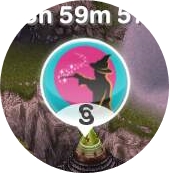
You can get it when completing Life Dreams & Legacies Quest. You can only use Salmon Singin every 30 minutes. Because the Singinng Salmon energy must be fully charged to be used. The circled image shows how much longer the singing salmon energy will be fully charged.

TIP: When you download the latest update of the game The Sims Freeplay, then automatically the whole sim you will be inspired!

How can I know if my sim is being insired?
The sim will look shiny, and the cupcake image will be gray

How big is the comparison between the results of simoleons and XP generated by sim inspired and sim that is not inspired?

Depends on what activities you are working on. We use an example

It depends on what they do but if you want to plant Watermelon, the sim that is not Inspired will produce S172, and 120XP while the Inspired sim will produce S256 and 180XP! They will also get more XP when completing any activities, such as watching TV, sleep, etc.

BIBLIOGRAPHY

How to Build Mezzed in The Sims Freeplay

After completing DIY Homes: All Mezzed Up Quest, you can add Mezzanine in the sim house!

Here’s how to make Mezzanine in The Sims Freeplay:

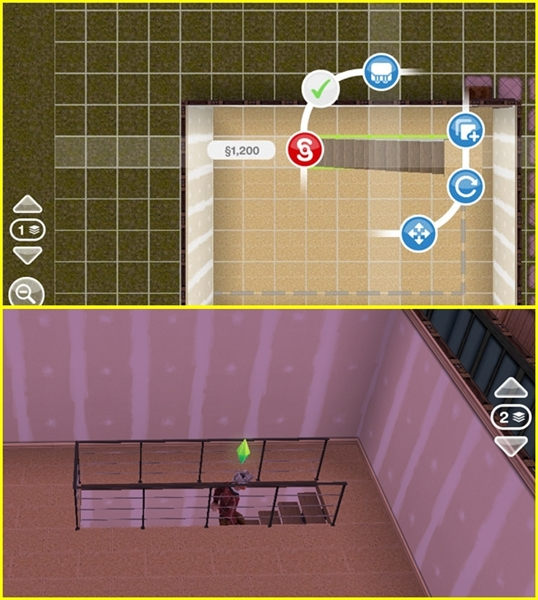
Open the Home Store click the “Mezzanies” section. Do it like making a room. Click the green check to complete the Mezzanine changes.

The number of simoleons that circle it is the price of the Mezzanine that you built.

TA DA … !! You made a Mezzanine!

Next, how to resize the Mezzanine The Sims Freeplay:

Note the white line circled in the image below

Drag the line aside like when making a Mezzanine. Click the green check to complete the Mezzanine changes.

Next, How to remove Mezzanine The Sims Freeplay:
To delete a Mezzanine, all you have to do is click on the middle of the Mezzanine until it looks like this

Then click the red symbol. Take it easy, you don’t have to bother saving all the Furnitire in the Mezzanine into the inventory. Because when you delete an array, all the items in it will automatically be stored in the inventory. The number that appears is the simoleon that you get from deleting the Mezzanine.

If there is a red color when building a Mezzanine, there may be a lamp below where you make mezzenine

You can also change the Mezzanine fence model by going to the Home Store, clicking on the “Railing” section. There are various forms of fences. Click the fence that you selected, then click on the Mezzanine that you want to change the fence.

BIBLIOGRAPHY

How to build Patios in The Sims Freeplay

After completing DIY HOMES: Paceful Patios Quest, you can add a Patios in the sim house!

Here’s how to make a Patios in The Sims Freeplay:
Open Home Store, click the “Patios” section. Do it like making a room. Click green check to finish changing the Patios.

The number of simoleons that circle it is the price of the Patios you build.

TA DA … !! You made a Patios!

Next, How to change the size of The Sims Freeplay Patios:
Note the white line circled in the image below

Drag the line like when making a Patios. Click green check to finish changing the Patios.

Next, How to remove The Sims Freeplay Patios:
To delete a Patios, all you have to do is click on the center of the Patios to look like this

Then click the red symbol. Take it easy, you don’t have to bother storing all the Furniture in the Patios into your inventory. Because when you delete an array, all the items in it will automatically be stored in the inventory. The number that appears is the simoleon you get from deleting the Patios.

If there is a red color when building a Patios (Patios):

Munkin because there are goods or plants nearby. Move the item first so as not to interfere with development

Maybe the Patios you made crosses the land boundary. Give a distance of 1 box from the sim landline to make a Patios, even if you want to make a Patios near objects, rooms, or other patios.

REMEMBER! You cannot build a Patios inside the house

You can also change the paving Patios motif by opening a home store, clicking “Paving patios”.
Kik on the patios you want to replace the paving.

You can also add fences and doors at once by opening the Home Store, clicking on the “Railing” section (to add a fence) and opening the home store section “Patios gate” (to add the door)

How to Build a Swimming Pool in The Sims Freeplay

After completing It’s All Going Swimmingly Quest, you can add a Swimming Pool on the sim home page! Swimming pool can be used by all ages except Baby and Toddler.

Here’s how to build a swimming pool in The Sims Freeplay:

Open Home Store, click the “Pools” section. Do it like making a room. Click the green check to complete the Pool changes

The number of simoleons circled is the price of building a swimming pool

TA DA … !! You managed to make a swimming pool!

Next, how to change the size of the Sims Freeplay Pool:
Note the white line circled in the image below

Drag the line like when making a Swimming Pool. Click the green check to complete the Pool changes.

Next, How to remove The Sims Freeplay Pool:
To delete a Swimming Pool, all you have to do is click on the center of the Pool until it looks like this

Then click the red symbol. Take it easy, you don’t have to bother storing all the swimming equipment in the Pool into the inventory. Because when you delete it, then all the items in it will automatically be stored in the inventory. The number that appears is the simoleon that you get from deleting the Pool.

If there is a red color when building a swimming pool:

Maybe because there are goods or plants nearby. Move the item first so as not to interfere with building

Maybe the pool you made crossed the land boundary. Give a distance of 1 box from the ground line sim to make a swimming pool, even if you want to make a swimming pool near objects, rooms, or other swimming pools.

Maybe the pool that you made is less spacious. At the very least, the pool must have a height of 5 boxes to be successfully built.

REMEMBER! You cannot build a Swimming Pool in a Swimming Pool

You can also change the pool paving motif by opening a home store, clicking “Pool Paving”. Click the paving motif that you selected, it will appear green as shown below:

Click on the pool you want to replace the paving.

You can also buy swimming equipment such as diving boards, slides, buoys, etc. in the Home Store section “Pool Items”

Note: You just have to place Pool Ladders so that the sim can come out of the pool

The swimming pool can also be dirty. The dirty swimming pool will be green. Click the pool, select “Clean” to clean the pool

You can use the Diving Board to do a Diving Hobby

BIBLIOGRAPHY

How to Add Basement inThe Sims Freeplay

After completing DIY Homes: Basement of Kings Quest you can add Basements or Dungeons in the sim house!

Note: Basement can only be built on the bottom of the sim house

Here’s how to make Basement in The Sims Freeplay:

Open Home Store, click the “Basement” section. When after you click “Basement”, you will be taken to the ground floor. There you will see white lines as drawn. This line shows the limit of the sim house area. But you can make Basement wider than the sim house area. Click the green check to complete the Basement changes.

TA DA … !! You made a Basement!

Next, how to resize Basement The Sims Freeplay:

Note the white line circled in the image below

Drag the line like when making a Basement. Click the green check to complete the Basement changes.

Next, How to remove Basement The Sims Freeplay:
To delete a Basement, all you have to do is click in the middle of the Basement to look like this

Then click the red symbol. Take it easy, you don’t have to bother saving all the furniture the Basement into the inventory. Because when you delete an array, all the items in it will automatically be stored in the inventory. The number that appears is the simoleon that you get from deleting the Basement.

If there is a red color when building the Basement, Maybe the Basement that you made crosses the land boundary.

REMEMBER! You must add a Ladder in the basement so that the sim can access the basement

BIBLIOGRAPHY

How to Add Balcon in The Sims Freeplay

After completing DIY Homes: Lovey-Dovey Balconies Quest, you can add a balcony in the sim house!

Note: Balcony can only be built on the upper floor of the sim house

Here’s how to make a Balcony in The Sims Freeplay:

Open the Home Store, click the “Balconies” section. When after you click “Balconies”, a yellow line will appear as shown. The yellow line is the limit of the balcony area that you can make.

Do it like making a room. Click the green check to complete the Balcony change.

The number of simoleons that circle it is the price of the balcony that you build.

TA DA … !! You make a balcony!

Next, How to change the size of the Balcony The Sims Freeplay:

Note the white line circled in the image below

Pull the line aside like when making a Balcony. Click the green check to complete the Balcony change.

Next, How to remove the Balcony The Sims Freeplay:
To delete a balcony, all you have to do is click on the center of the balcony to look like this

Then click the red symbol. Take it easy, you don’t have to bother storing all the furniture in the Balcony into your inventory. Because when you delete an array, all the items in it will automatically be stored in the inventory. The number that appears is the simoleon that you get from deleting the Balcony.

If there is a red color when building a balcony:

Maybe the balcony you made crosses the land boundary. Give a distance of 1 box from the sim land line to make a balcony, so also if you want to make a balcony near objects, rooms, or other balconies.

Maybe the balcony you made crosses the yellow line.

REMEMBER! You cannot build a balcony in the house

You can also change the Balcony paving motif by opening the home store, click “Balconie Paving”. Click on the paving motif that you selected, it will appear white as shown below, then Kik on the balcony you want to replace the paving

You can also change the balcony railing model by going to the Home Store, clicking on the “Railing” section. There are various forms of fences. Click the fence you choose, Click on the Balcony you want to change the fence.

How to Add Stairs in The Sims Freeplay

You can only add stairs after you complete the Multi Story Renovation Quest. The first step to place the person in the house is to open the home store, click “Floor Constructor”.

Floor Constructor functions to add the upper floor of the sim house. When you click Floor Constructor, a white fence will appear above the sim house.

Click the white fence to add the upper floor.

Each floor has a different price:
Floor 2 = S300,000
Floor 3 = S500,000
Floor 4 = S800,000
Floor 5 = S1,000,000

After that, you must build a room on the upper floor by:

Click the picture as below. the image is used to view the upper and lower floors

Then open the Home Store, click on “rooms”. Do it like making a room. Click here to create a room in The Sims Freeplay

After the room is finished. Go back to the floor below. Place the stairs just below the room you made on the 2nd floor. Stairs can be purchased at the Home Store “Stairs” section

NOTE: You must make a room on the second floor before you can add stairs!

The reason you cannot place a ladder at home is:

Maybe there are items in your place where you put the stairs.

Maybe the stairs that you put on are too big or bigger than the room where you put the stairs.

There maybe items in front of the stairs

Maybe there are goods or your stairs obstructed by a wall upstairs. Try checking the upper floor. Whether the stairs are too tight with the wall, or there are items that block the stairs.

If your household is too big and not enough with the room, choose a staircase with a minimalist model. Do not place the stairs too close to the wall of the floor 2. Location of Stairs 2 or 3 cities in front of the wall of the second floor, remove items that block the stairs.

You now have stairs in Sim’s house!

On what floor do I have to put up the stairs?
You have to place the stairs on the 1st floor to get up to the 2nd floor, place the stairs on the 2nd floor to go up to the 3rd floor and so on

If I delete my house do I still have floors 2 and 3 or do I have to buy it again?
Unfortunately you have to buy it again

If I add 4 floors, that means I can add 4 more sim to stay at the house?
No, maximum sim lives in 1 fixed 4 sim house

How to Build a Room in The Sims Freeplay

To build a house in The Sims Freeplay, the first thing you have to do is build a room. Here you will provide information about How to Build, delete and change The Sims Freeplay Room.

Here’s how to make a room in The Sims Freeplay:
Open the Home Store. Click the “Rooms” section. After clicking, place your finger in the middle of the screen, press, and slide it to form a room like the picture below:

The number of simoleons that circle it is the price of the room you built. Click the green check to complete the room change

To make the room next to it, you just need to do it like making the room before.

TA DA … !! You made a room!

Next, how to change the size of The Sims Freeplay room:

Note the white line circled in the image below

Pull the line aside like when making a room. Click the green check to complete the room change.

Next, How to delete The Sims Freeplay room
To delete a room, all you have to do is click in the middle of the room to look like this

Then click the red symbol. Take it easy, you don’t have to bother storing all the items in the room into the inventory. Because when you delete a room, automatically all the items in it will be stored in the inventory. The number that appears is the simoleon you get from deleting the room.

If there is a red color when building a room as shown below, maybe because there are items or plants nearby. Move the item first so as not to interfere with creating a room

Maybe it’s because of the room you made through the wall of the room in front of it.

Maybe there are items in your place to build a room.

Maybe your room crossed the land boundary

REMEMBER! You can’t build a room in the room

BIBLIOGRAPHY

Cities and Buildings in The Sims Freeplay

There are many types of buildings in The Sims Freplay. This building can be built using simoleons, LP, or by using special materials for buildings on Mysterious Island.

Every time you build a building or house, your Town Value Simtown will increase. The more Town Value amounts, the greater the Reward income you earn.

NOTE: You cannot do 2 developments at a time. You must complete the construction or repair process before you can just do a new construction or repair.

Building buildings in sim city
There are 3 areas in the sim city, click on each link to find out more information:


SIMTOWN
PETA SIMTOWN THE SIMS FREEPLAY
MAP SIMTOWN THE SIMS FREEPLAY

You need to complete the Quest and fulfill some requirements to be able to build most of the buildings in Simtown:

HOUSE (Standart Residance)


PREMIUM HOUSE (Premium Residance)

The house symbol, as shown in the picture, is empty land that a house can build. Just click on the symbol, so you will be provided with a choice of homes from the low price to the price using SP. If the house symbol is gray, it means that you are in the process of building another building or the number of houses that you own is maximal.

There are 2 types of houses in The Sims Freeplay namely Standart House (house with blue symbol) and Premium House (House with yellow symbol). The new Premium House will open after you complete Ocean View State Quest. Premium house has a wider page

You can’t carelessly build a house. There is a limit to the number of houses in each level. You have to raise the game level to be able to add a sim and a new home.

Besides having a choice of houses that you can directly occupy, you can also buy vacant land, so you can make and design your own house.

Next I will explain how to build a sim house. Click each link provided to find out more information:

Building, Removing and Changing Room Size = the first step to making a house

Adding Stairs = after completing the MultiStory Renovations Quest, you can add stairs in the sim house 

Adding a Swimming Pool = after completing Its All Going Swimmingly Quest, you can add a Swimming Pool 

Add Patios = after completing DIY HOMES: Peaceful Patios Quest you can add a terrace in the sim house 

Add Balcony = after completing DIY HOMES: Lovey-Dovey Balconies Quest You add a balcony in the sim house 

Add Basements = after completing DIY Homes: Basement of Kings Quest you can create a room in the sim house 

Add Mezzed = After completing DIY Homes: All Mezzed Up Quest, you can make mazzed inside the sim house 

Can I delete the sim house that I have already built?
Yes. To delete the sim house, the house must be empty. You have to move the sim and the pet to another place. You cannot thirst or evict the sim house if there is still a sim or pet inside.

Click the sim house that you want to delete, select “Dimolish”

Have you built an amazing house that you want to share with others?
You can also send your home made to EA for review. And if Ea likes your home design, they will display your home on architects homes.

Click here to find out how to Submiting a House


PARTY BOAT

Part Boat is used to visit neighbors. Here is where you complete Social Tasks.


SEA VOYAGE BOAT
Is a ship that will take you to 2 cool islands !! The two islands are Tropical Romance Island (a romantic island, where there are special facilities for couples sim) and Magical Rainforest (Island with fairy themes)


PARK
City Park. Here is a gathering place for sim that brings Discovery Quest. Here is also where you do Bird Feeding, Tai Chi and interact with Man Statue (sitting statue)


POLICE STATION
  This is the building of the career profession. After building this building, sim can work as a police officer


COMMUNITY CENTER
Here is where you meet the Pirates (pirates) in The Pirate and His Goddess Quest. Here is also the first place for sim to do Karate and Balley Hobby.


CAMPGROUND
A place to camp, and do a Survivals and Telling Story Hobby. Here sim can also take a boat on the lake


FIRESTATION


Workplace as a Firefighter


SNOW PARK
Snow park used for ice skating


SORCEROUS SUPPLIES STORE
Magic shop, which after you build it, you will be given a Book Of Spells Quest. In this shop you can buy magic items


HAIR SALON
Gives you an additional sign model when building it


PROMOTION R US
Hobby and career equipment stores


PET STORE
A place to buy pets


COSTUME AND SWIM STORE
After you build this shop you can get various kinds of swimsuits that you can find in the Wardrobe.


CHILDER’S STORE
Special shop for children’s toys and equipment such as baby cots etc.


RESTAURANT
This building can only be built when you get the Sous Judgemental Quest


ART GALLERY
This is a career Where after you have finished building this building, sim can work as an Artist


TOWN HALL
After building this, sim can work as a politican


SWIM CENTER

Swimming pool, and place to do the Toddler Playhouse Hobby


SCIENCE LAB
After building this, sim can work as a Scient


SIMTOWN ELEMENTARY SCHOOL
You can send Preteen sim to school


SIMTOWN HIGH SCHOOL
You can send Teen sim to school


PET SALON

Costume for pets


HEALTH HUB
GYM. Place to do Aerobic Hobby


COMPETITION CENTER
Building for competition


MOVIE STUDIO
This is the building of the career profession. After building this building, sim can work as a producer


STADIUM
After building this, sim can work as an Athlete


NIGHTCLUB
A building that is deep like a Night Club. You can be a dj, bartender, and dance like a night club activity in general


MALL
After you build it, you will be given Sunset Mall Quest. If you can open all shops in the mall, you can use a variety of new clothes and make up for the sim!

Here is also the place to do Catwalk Hobby and Artist Makeup Hobby

Click here to find out how to open all shops at Sunset Mall The Sims Freeplay


RECORDING STUDIO
After building this, sim can work as a Musician


SUPERMARKET
To buy food ingredients for cooking and seeds for gardening


CAR DEALERSHIP
To buy a car


REAL EASTATE AGENCY
After building this, the sim can work as a Real Estate Agent


MATERNITY STORE

To buy maternity clothes, and to get an A Bumb-Y Ride Quest


SIMTOWN SIGN
This sign can only be built by completing Teen Idol Hobby (collecting all melody items). After that, click “reset collection”. Collecting the second item is a way to collect ingredients to build a sign sim.

After Simtown sign is complete, you will get a Teen Idol Mansion for free


SIMTOWN EXPRESS
Used to go to Downtown


MYSTERIOUS ISLAND 


You can only open Mysterious Island after completing The Mysterious Island Quest.

Most of the buildings on mysterious island can only be built using Orb.

Click here for an explanation of the Life of Dreams and Orb The Sims Freeplay

You need to complete missions and other requirements before you can build most of these places:

HOUSEBOATS

Boat house, you can build it after upgrading the Monument The Tempest of Bills level 5, and other monument monuments (every time you successfully upgrade monuments to a certain level, you will open houseboats). Like an ordinary house, when you click houseboats, you will be given a choice of houses that are ready to use.


MONUMENT

There are 4 monuments on Mysterious Island. Each monument has an impact every time you upgrade

The Flames Of Wisdom

By upgrading this Monument, sim will get XP bonus every time you do any activities, sleep, watch tv, cook, garden, etc. The more upgrading levels, the greater the XP bonus earned


The Riches Of Terra 

By upgrading this Monument, sim will get a bonus simoleons every time you do Gardening, Baking and working activities. The more upgrading levels, the bigger the bonus simoleons you get.


The Tempest Of Bills

Sorry I don’t know the purpose of this monument


The Springs Of Fortune

Sorry I don’t know the purpose of this monument


Island Volcano

You must upgrade all monuments to level 70 to activate Island Volcano. After you upgrade all the monuments to level 70, then Island Volcano will start active. And it turns out it’s not what we imagined. Island volcano takes 24 hours to be ready to be activated. After 24 hours or when Island volcano is active, there will be magma / lava in the volcano island. After you click, Island volcano will not explode or cause an earthquake. But you will get 750 Simoleons and 500XP.


ANCIENT GODDES MONUMENT

By upgrading Acient Goddess Monument, you can get bonus hobby skills every time you do any bobby, so sim can level up faster because the percentage of skills increases more.


PIRATE SHIP 

This pirate ship is used to trade resources (resourch) which will produce Ancient in every sailing vessel. You need Artifact, simoleons, SP etc. according to the terms of the ship. You have to wait 24 hours until the ship returns and can be used again. Or you can also speed up your return by using 23LP. Acient is used to upgrade the Goddess Accient


STABLES
Horse stables, here you can do horse riding hobbies


BEACH
This is a quiet beach … :v. Here you can do Surfing Hobby, Snorkle Hobby, and Seashell Hobby.


CARNIVAL
A cool Carnival !! Here is the place to do Juggling Hobby and High Striker Hobby


ARCADE

Game Center. Here are some arcades that can be used by certain ages, namely Teen, Preteen and Adult. Here is also the place to start Arcade Hobby


BARKSHIRE PET PARK

You need 2 Bronze ife Orb and 4 Silver Life orb to be able to build a pet park. This building contains a race arena for pets. Here is also the place to do the Cat Show and Dog Agility Hobby

The Cat Show Pavilion requires 1 platinum Life Orb and 3 Golden Life Orb to build it. By building this building, sim and pets can do the Cat Show hobby.

Nine Life Cafe is a hangout for the sim. You need 2 Silver Life Orb and 3 Golden Life Orb

Dog Agility Ground is an arena for sim doing Dog Agility hobbies. You need 3 Silver Life Orb and 2 Golden Orb


CASTLE

After you build the castle, you will be given a Royal Lineage Quest. Here is a place to do Archer Hobby and Jester hobby. After you open the second floor of Castle, you can become a King or Queen who has the authority to govern all the sim throughout the game.

When you click Throne King, there will be several choices, namely:

Rule = Sim will change using the king / queen costum and start reading commands (no effect whatsoever)

Lover’s Day = Sim will start reading the rules that in a whole day the whole sim opens his heart so that it is easy to fall in love! wkwk … After reading this rule, the whole sim will automatically be easier to build a romantic relationship for 24 hours

Nation Hat Day = Sim will start reading out the rules that in a full day the whole sim must wear a hat. After reading this rule, the whole sim will automatically wear a hat with various types of hats for 24 hours

Walk Like Zombies = Sim will start reading the rules that in a full day the whole sim must run like a zombie !! After reading this rule, all sims will automatically run like zombies for 24 hours

Rainy Day = Sim will start reading the rules that in a full day all over the city must rain for 24 hours! (authority, even nature obeys the king’s command!)

The circled image shows how many hours the rules will expire

If before 24 hours you want to change the rules, you can speed up using LP. The amount of LP depends on how many hours are left in the previous rules


BINGO HALL

This building is like a gambling place that can only be used by senior sim. Unfortunately we can’t see inside the building.


DOWNTOWN 


You must complete Simtown Express Questt to be able to fully access Downtown.


HOSPITAL
This is the building of the career profession. After building this building, sim can work as a Doctor or Nurse


PENTHOUSE APARTMENT
The system is the same as a normal house, only you have city captures from the top of the building!


DOWNTOWN HIGH SCHOOL
After you build this building, you will be given Teacher’s Pet Quest. Downtown Highschool is the place to do the Class Clown Hobby. It looks like a school in general. There are sports fields, classes, laboratory rooms, teacher rooms, and computer rooms


What is the cost and time needed for each development?
Prices and times vary depending on how many buildings you have in the city. For example, every time you build a new house the price will increase for the next house construction but not for the career building and every time you build a new career building, the price will increase for the construction of the next career building but no effect on the house price.

BIBLIOGRAPHY